Conversion Optimization
How to Run a CRO Analysis: Step-By-Step Guide For eCommerce
January 5, 2026

Insights in this post come from our CRO team's decade of experience working with eCommerce brands. Edited by our in-house content team.


Insights in this post come from our CRO team's decade of experience working with eCommerce brands. Edited by our in-house content team.

To truly improve your website performance, you must move beyond educated guessing.
Running a CRO analysis isn't about sitting in a darkened room wondering if a "Burnt Sienna" button might outperform a "Safety Orange" one.
It is a rigorous, though fascinating, bit of detective work.
We do this by blending two very different, but equally vital, types of information:
Quantitative Data: This is the "what." It’s the cold, complex numbers of your site conversion rate, bounce rates, and exit pages.
It tells you, with mathematical certainty, that people are leaving your site the moment they see your shipping costs, usually in a bit of a hurry.
Qualitative Data: This is the "why." Through tools like user heatmaps, session recordings, and direct feedback, we get to peer over our customers' shoulders (in a strictly professional, non-creepy way).
We see them clicking on things that aren't buttons and getting hopelessly confused by a checkout form that asks for their blood type.
When you put these two together, you stop throwing darts in the dark and start building a business that actually makes sense to the people using it.
It’s about moving from a state of hopeful bewilderment to one of data-backed confidence.
This post covers:
1. Defining Success: Knowing a Win When You See One
2. The Need for Site Speed (and Other Technical Politeness)
3. The Digital Sales Assistant: Perfecting Your Product Pages
4. Perfecting Your Checkout Flow
5. Peer Over Their Shoulders: Heatmaps and Recordings
6. Hear It from the Horse’s Mouth: The Power of Surveys
7. The "Aha!" Moment: Turning Clues into a Plan
8. The Moment of Truth: Reading the Results Without Squinting
9. The Perpetual Motion of Growth: Making CRO a Habit
If you’ve found yourself nodding along but are currently in a bit of a hurry, here is the gist: conversion rate optimization is not a one-time chore, but a continuous journey of making your website less confusing for the humans who use it.
Stop relying on "gut feelings" and start using a data-driven approach.
A proper CRO analysis blends the "what" (complex numbers from analytics) with the "why" (user behavior like heatmaps) to find exactly where people are getting stuck in your sales funnel.
Whether you do a CRO audit yourself or bring in a fresh pair of eyes, the goal is to identify friction and test solutions through A/B testing.
By constantly refining the user experience, you stop wasting money on traffic that doesn't convert and start seeing genuine business growth.
In short: you need to look at the data, fix the hurdles, and stop guessing.
Running a CRO analysis involves transforming raw user data into a strategic roadmap for revenue growth.
By identifying the friction points that cause visitors to drop off, you can shift from making "gut-feel" design choices to implementing data-backed optimizations.
This guide will walk you through the essential tools and frameworks needed to decode user behavior and turn your existing traffic into a high-converting engine.
There’s a particular kind of digital heartache that comes from celebrating a "win" that doesn't actually do anything.
It’s like finding a five-pound note in an old coat pocket, only to realize you’re in a country that only accepts seashells.
You might see a metric go up, but if your bank balance remains stubbornly unmoved, you haven't actually won; you’ve just moved some digital dust around.
Before you start peering into user behavior or obsessing over heatmaps, you must decide what "success" looks like for your specific venture.
The median conversion rate across the vast, tangled web is about 6.6%, but comparing yourself to that is like comparing your height to the average height of all mammals.
It’s a number, indeed, but it doesn't tell you if you can reach the top shelf.

Most people start with a goal like "I want more leads," which is roughly as helpful as saying "I’d like to be happier." To run a data-driven strategy, you need to be frustratingly specific.
Consider the difference:
When you set these targets, work backward from your bottom line.
If you know you need fifty new clients a month to keep the lights on and the biscuits flowing, and only 10% of leads actually sign a contract, then you know with the sort of clarity that usually requires a telescope that you need 500 qualified leads.

In the grand game of business, we often obsess over the "Macro Conversion," the big sale, the signed contract, the moment the gold hitches a ride into our pockets.
But focusing only on the finish line is like watching only the final ten seconds of a marathon. You miss the whole story.
Micro conversions are the smaller, quieter signals that someone is interested in what you’re saying. They are the "early intent" indicators, such as:
By tracking these smaller actions, you can see where the friction begins long before the customer disappears entirely.
If everyone is watching your demo video but nobody is booking a call, you don’t have a traffic problem; you have a "what happens after the video" problem.
A word of caution: Don't try to track everything. You'll drown in a sea of meaningless data.
Pick three to five key actions that actually lead to a sale and focus your website optimization there. It’s about turning those small, hopeful nods of interest into major, measurable wins.
Further Reading: 36 eCommerce Metrics and KPIs that Actually Matter

Website conversion rates drop by an average of 4.42% with each additional second of load time (between seconds 0–5). (Source)
We live in an age of remarkable digital impatience. If a website takes more than a few heartbeats to appear, most of us react as if we’ve been asked to wait in a post office queue behind a man mailing forty-seven individual jars of jam.
We simply won't have it.
As a business grows, its website tends to become "richer," which is a polite way of saying we start cluttering it up with fancy widgets, high-resolution videos, and various clever apps.
Unless you pay close attention, these "improvements" act as digital anchors, slowing your site's speed until your visitors give up and go elsewhere.
Google, too, has very little patience for a sluggish site; they prioritize website performance because they want their users to have a pleasant time, not a nap.
To truly understand if your site is behaving itself, you need to look at what the experts call Core Web Vitals.
While the names sound like something from a mid-century sci-fi novel, they are actually quite sensible:
Behind all of this sits your server. You must keep an eye on your Time to First Byte (TTFB), essentially how long it takes your server to wake up and acknowledge a visitor’s request, and the First Contentful Paint (FCP), which is the very first moment anything at all appears on the screen.
You don’t need a room full of supercomputers to track this. Most modern platforms offer a performance dashboard that ranks these metrics as "good," "moderate," or "poor."
It provides a ready-made "to-do" list, showing you exactly where to roll up your sleeves to ensure your user experience is as swift and seamless as a greased slide.

On a well-run website, your product pages are essentially your digital sales assistants.
In a physical shop, a helpful clerk can see the look of mounting confusion on a customer’s face and step in to explain that, yes, this vacuum cleaner does work on shag carpets. Online, you don’t have that luxury.
You must anticipate every question, soothe every doubt, and nudge the visitor toward a "yes" without burying them under a mountain of boring text.
Rather than trying to overhaul every single page at once (a task that would lead only to madness), you should be strategic.
Use your data-driven approach to look at your "product insights."
Identify the items that are languishing in the middle of the pack, those that account for a decent chunk of your revenue but aren't quite reaching their potential.
These are your prime candidates for conversion rate optimization.
Once you’ve identified which pages need a bit of a polish, gather some qualitative data, ask your customers what’s missing, or watch a few session recordings.
You might find that success lies in a few simple adjustments:
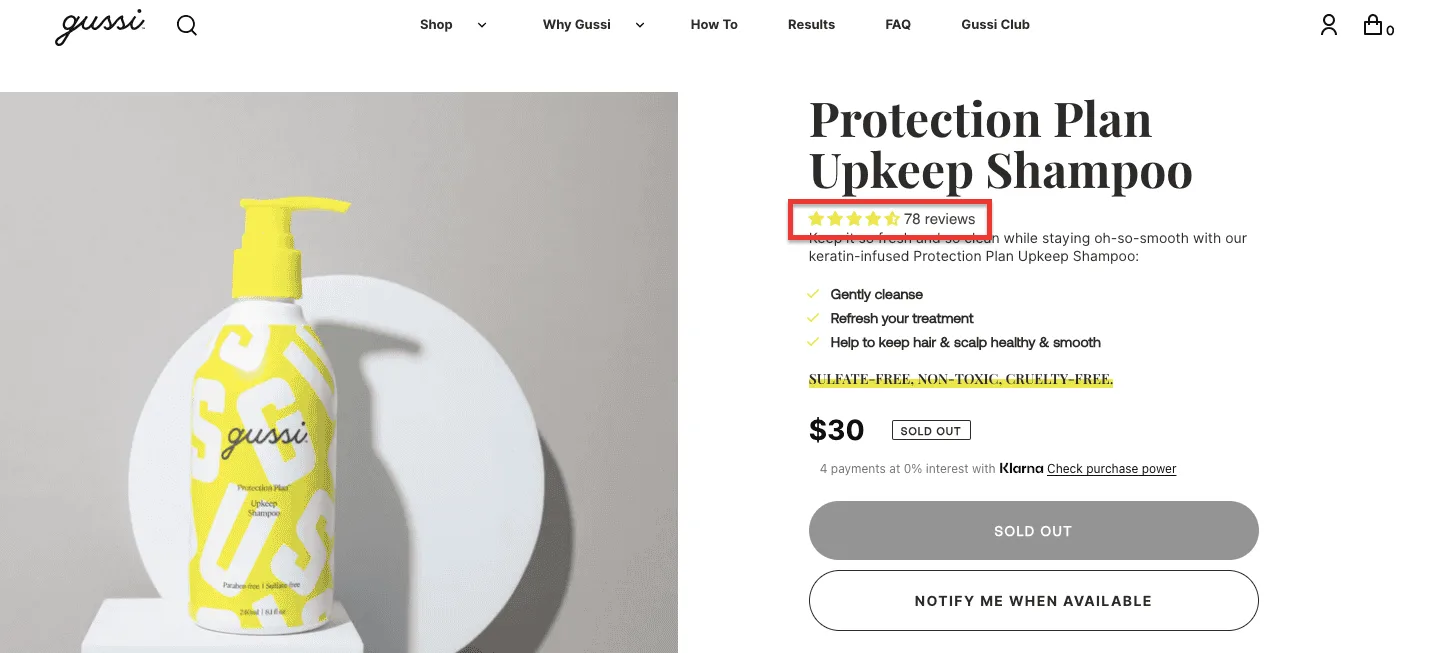
By treating these pages as living experiments, you turn a static display into a persuasive, high-performing engine for business growth.
Tax: 22% of shoppers abandon their carts specifically because the checkout process was too long or complicated. (Source)
If a visitor has reached your checkout page, they have essentially walked through your front door, browsed the aisles, and are now standing at the counter with their wallet out. This is a very delicate moment.
One sudden movement or one unnecessary form field, and they may bolt back into the street, never to return. In the world of CRO, the checkout is where we must be our most helpful and least intrusive.
To improve conversion rates at the finish line, you must ruthlessly eliminate "friction."
Do you really need to know their middle name or their favorite color to ship a package? Probably not.
A data-driven look at your checkout often reveals that the biggest culprit for cart abandonment is a mandatory account creation wall.
👉 Letting people "Checkout as a Guest" is the equivalent of not asking for a customer's life story before selling them a newspaper.
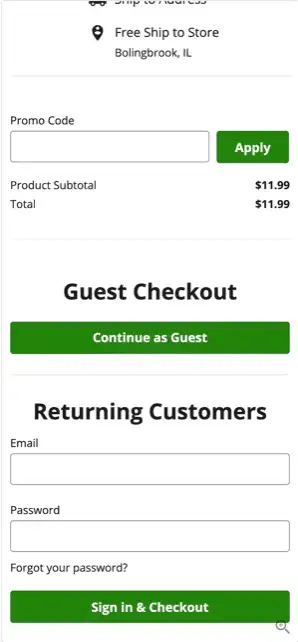
👉 You should also look at your "trust signals."
👉 Ensure your shipping costs are transparent from the start and that payment icons are clearly visible.
A sudden, unexpected delivery fee at the final stage is the quickest way to turn a "Yes" into a "Not on your life."
By streamlining the path and offering popular, one-click payment options, you ensure the transition from "interested visitor" to "happy customer" is as smooth as a freshly waxed slide.
Further Reading: How Do I Increase My Website’s Checkout Rate? (21 Proven Ideas)
Ever wish you could stand behind your visitors and see exactly what they’re doing? Well, in a perfectly legal and handy way, you can.
Heatmaps and session recordings are the closest things we have to a digital magnifying glass.
They allow us to watch how people move through your website, rather than how we hope they move.
A heatmap shows you where the "action" is, where people click, where they linger, and, perhaps most importantly, where they ignore you entirely.
Keep a sharp eye out for these warning signs:
The Vanishing Act: If your scroll map shows that 90% of people stop reading before they reach your pricing, your most crucia
Session recordings are even more illuminating. They show you the "why" behind the numbers.
You’ll see "rage clicks" that rapid, staccato clicking that signals a user has run out of patience.
You’ll see the "furrowed brow" of a mouse cursor wandering because the visitor can't find the menu.
You might discover that your perfectly crafted landing page looks marvelous on a desktop but hides the "Buy" button behind a giant pop-up on a smartphone.
Given that most browsing happens on mobile these days, these tiny friction points are often the only thing standing between you and a significant increase in conversions.
By watching these "movies" of user behavior, you stop guessing what’s wrong and start fixing what’s broken.
If heatmaps and recordings show you what your visitors are doing, surveys tell you why on earth they’re doing it.
It is one thing to watch a man walk up to your front door and suddenly turn around; it is quite another to ask him, "Excuse me, was it the gargoyles?"
User surveys are your direct line to the human brain. The beauty of this approach lies in its startling simplicity.
A few well-placed questions can uncover "conversion blockers" that might take months to find through A/B testing alone.
Sometimes, the reason people aren't clicking is so simple that you’ve completely overlooked it, like a missing shipping price or a confusing term.
To get the best voice-of-customer insights, you don't need a hundred questions. You just need the right ones, such as:
Tools like Hotjar or Google Forms make this remarkably easy. You can even use "micro-surveys," those polite little boxes that slide in at the bottom of a website to catch feedback in the moment.
Don’t spray questions at everyone; you’ll only annoy them. Instead, be a bit more surgical.
Focus on visitors who have spent three minutes on your page but haven't moved a muscle, or those who added something to their cart only to abandon it at the last second.
When you combine the complex numbers of your CRO analysis with the actual words of your customers, the path to business growth becomes much clearer.
You stop guessing what they want and start providing exactly what they’re asking for.

Once you’ve gathered your pile of data, the heatmaps, the surveys, and the slightly alarming bounce rates, you might be tempted to simply start changing things at random.
Resist that urge. To move from a "poking at things" approach to a genuine data-driven strategy, you need a hypothesis.
A hypothesis is essentially a sophisticated way of saying: "Because we saw this, we think changing that will lead to this result."
It is the bridge between a raw observation and a meaningful A/B test. Without it, you aren't optimizing; you’re just redecorating.
A proper, grown-up hypothesis is grounded firmly in user behavior. Instead of saying, "I think we should make the button red," a CRO expert would say:
"Because we saw that 40% of mobile users stop scrolling before reaching the price (the observation), we believe moving the price higher on the page (the change) will increase demo bookings by 15% (the expected outcome)."
See the difference? You’ve identified a specific friction point, proposed a logical cure, and set a goal you can measure. This ensures that every tweak you make to your website has a clear purpose.
By grounding your ideas in evidence, you take the ego out of the room. It’s no longer about who has the loudest opinion in the meeting; it’s about what the data is saying (or occasionally shouting) at you.
This disciplined approach to improving conversion rates ensures that you aren't just busy, you’re being effective.
You’re no longer guessing at what might work; you’re conducting a series of small, calculated experiments that lead directly to business growth.
Further Reading: A/B Testing for Landing Pages: 54 Time-Tested Ideas
Once the dust has settled on your A/B test, you’ll be faced with a collection of numbers that will, at first glance, look like they’re trying to tell you something.
The temptation here is to grab the first positive-looking digit and run through the office shouting for joy. But proper CRO requires a bit more sobriety.
To improve your website performance for the long haul, you must interpret your results with what I like to call "scientific rigor."
In the world of data, things are not always as they seem. You might see a 5% increase in sign-ups and assume you’ve cracked the code.
However, you must first ask if your results are statistically significant.
If only ten people visited your site during the test, that "win" is likely just a mathematical hiccup; a digital equivalent of a coin landing on heads three times in a row. It’s a fluke, not a trend.
A truly data-driven strategy involves digging deeper than the surface "headline" numbers. You should segment your results to see what actually happened:
Sometimes, a test fails. The "improved" version performs worse than the original. In my opinion, this is not a disaster; it is a discovery.
It tells you something vital about what your customers don't want, which is often just as valuable as knowing what they do.
By analyzing why a test failed, you gain the user behavior insights needed to craft a better hypothesis for the next round.
It’s an ongoing cycle of learning, and every result, good or bad, is a stepping stone toward genuine business growth.
There is a common misconception that conversion rate optimization is a sort of digital "spring cleaning," something you do once a year when the clutter becomes unbearable, only to ignore it until the following April.
But in reality, the most successful companies treat it more like a healthy diet or a regular walk in the park.
It is a persistent, quiet habit that keeps the entire operation from becoming sluggish.
The digital world, much like a garden, is never truly "finished." Technology shifts, customer expectations rise, and your competitors are likely tinkering with their own websites at this very moment.
If you stop optimizing, you aren't just standing still, you’re slowly sliding backward.
Turning your CRO analysis into an ongoing habit means moving from emergency repairs to a culture of continuous curiosity.
To keep the momentum going, you needn't overhaul your entire strategy every week. Instead, focus on a steady rhythm of:
When you make these steps a part of your regular business routine, the results begin to compound.
A 1% improvement this month and another 1% next month might not feel like a revolution.
Still, over a year, they add up to a formidable increase in sales and a vastly superior user experience.
By making growth a habit, you ensure that your website remains a sharp, effective tool for business growth, rather than a dusty relic of last year's best guesses.
Further reading: We Ran 8 Scientific CRO Experiments & Here’s What Increased Conversions
In the end, running a data-driven CRO analysis is less about reaching a final destination and more about adopting a new way of seeing.
It is the realization that your website is a living conversation, not a static monument.
By trading in your "gut feelings" for the rigorous clarity of performance metrics and user behavior, you stop shouting into the void and start responding to the real needs of your visitors.
Whether you’re a founder of a budding startup or at the helm of a global corporation, the path to business growth remains the same: identify the friction, listen to the humans on the other side of the screen, and never stop testing your assumptions.
So, go ahead and open that analytics dashboard, fire up a heatmap, and ask your customers a question or two.
The gold is there; you simply have to stop guessing and start looking for it.
A CRO analysis is a comprehensive health check-up for your website.
Rather than relying on a "gut feeling" that your homepage looks "rather nice," this process uses a data-driven approach to examine precisely how visitors navigate your pages.
It is the systematic study of where people click, where they stumble, and crucially, where they vanish.
By scrutinizing both the complex numbers and real human behavior, you identify the friction points preventing a sale.
Ultimately, it’s about transforming your website from a passive brochure into a finely tuned engine for business growth.
The primary charm of a CRO analysis is that it allows you to stop burning money on expensive advertisements just to fill a "leaky bucket."
Instead of constantly hunting for new visitors, you focus on making the ones you already have much happier.
By identifying and removing the invisible hurdles on your website, you naturally see an increase in sales and a much healthier return on investment (ROI).
Furthermore, it takes the guesswork out of decision-making.
Rather than having a heated debate in a boardroom about whether a button should be "Teal" or "Aquamarine," you simply look at the evidence.
This data-driven strategy also improves the user experience (UX), making your site a joy to navigate rather than a digital obstacle course.
When customers find what they need without a struggle, they don’t just buy, they return.
It’s the difference between shouting at passersby with a megaphone and simply opening the door wider.
In the grand, often bewildering journey of online shopping, a funnel analysis is the map that shows us where travelers get lost.
It tracks the specific steps a user takes from landing on your homepage to clicking "Purchase" and reveals exactly which stage is causing them to flee in terror (or boredom).
If 10,000 people see your product but only 2 add it to their cart, the funnel tells you exactly where the "leak" is.
Attribution, on the other hand, is the art of giving credit where it’s due. It helps you understand which touchpoint, perhaps a witty email or a helpful blog post, actually nudged the customer toward a sale.
Without proper attribution, you might accidentally stop funding the very thing that’s driving all your business.
Together, they provide a clear picture of the customer journey, ensuring your marketing efforts are actually pointing in the right direction.
Once your analysis has highlighted a problem, CRO testing is the laboratory where we find the cure.
The most common method is A/B testing (or split testing), which is far simpler than it sounds.
You create two versions of a webpage: Version A (the original) and Version B (with one specific change, like a more straightforward headline).
You show these to two similar groups of visitors and see which one performs better.
It’s a bit like a scientific experiment, but with fewer lab coats and more spreadsheets.
This process allows you to validate your ideas with real-world behavior before committing to a permanent change.
Instead of hoping a redesign will work, you know it will work because the data has already told you so.
This iterative process of website optimization ensures that every tweak you make is a step toward a more profitable and user-friendly experience.
A CRO audit is a deep-dive inspection of your entire digital presence. Think of it as a structural survey for your website.
It involves a meticulous examination of everything from your page load speeds to the clarity of your "Call to Action" buttons.
A thorough audit looks at your Google Analytics, pours over heatmaps, and might even involve watching recordings of real people trying (and sometimes failing) to use your site.
The goal is to produce a prioritized list of "friction points," those pesky elements that confuse, annoy, or distract your visitors.
It isn't just about finding what's broken; it's about uncovering missed opportunities where a small change could lead to a significant increase in conversion rates.
By the end of an audit, you move from a state of "I think our checkout is okay" to a clear, actionable roadmap for business growth.
The short answer is: sooner than you think, and more often than you’d expect.
A CRO audit is particularly vital if you notice your traffic is high, but your sales are flatlining, a classic sign that your website is failing to "close the deal."
You should also conduct one before a major site redesign; there is very little point in moving all your furniture into a new house if the roof still leaks.
However, even a healthy site needs a check-up. Consumer habits change, new technologies emerge, and your competitors certainly aren't sitting still.
If you haven't scrutinized your user journey in the last six months, you are likely leaving money on the table.
Whether you are a small startup or a massive corporation, a regular audit ensures your digital marketing strategy remains aligned with how real people actually behave in the wild.
The duration of a CRO audit depends mainly on the complexity of your website and how much data you’ve already collected.
For a modest site, a thorough "sprint" audit might take anywhere from two to four weeks.
This allows enough time to gather a statistically significant amount of user data, analyze heatmaps, and squint thoughtfully at the analytics.
If you are a massive company with thousands of pages and complex user paths, the process can take longer, perhaps six weeks or more, to ensure every nook and cranny is inspected.
It’s important not to rush the "data gathering" phase; if you only watch three people use your site, you aren't doing science, you're just eavesdropping.
A proper audit requires patience to ensure the patterns you see are genuine trends rather than mere coincidences.
You certainly can, provided you have a healthy appetite for data and a fair amount of objectivity.
There are many excellent CRO tools, such as Hotjar for heatmaps or Google Analytics for numbers, that make the task accessible to the determined amateur.
You’ll need to set aside your personal attachment to your design and view your website through the cold, unsympathetic eyes of a stranger.
However, many founders and marketers find that they are "too close" to the project to see the obvious flaws.
It’s the classic problem of not being able to see the forest for the trees (or the broken 'Buy' button for the lovely hero image).
While a DIY audit is a fantastic way to start improving conversion rates, bringing in an outside expert can often provide the fresh perspective needed to spot the hurdles you’ve become subconsciously blind to.
Subscribe for more articles like this!



Read by 5000+ ecommerce store owners
.svg)


.svg)

.svg)
.svg)
2026 Convertcart, All Rights Reserved
33/1, Castle Street, Ashok Nagar, Bengaluru, India
