Are your Facebook Marketplace listings getting zero messages? And are you worried that your product pricing is the reason why it's happening? Here's the surprising part: it usually isn't.
One pattern that surprised us after a decade of auditing Facebook Marketplace listings is that the listings that converted best weren't the cheapest.
They were simply the easiest to trust. That's because buyers don't decide whether to message you by calculating value.
They decide in seconds, by asking themselves three questions:
Can I trust this seller?
Do I understand exactly what I'm buying?
Will this transaction be easy?
If you leave any one of them unanswered, then no discount will save your listing.
That’s why we’ve put together this comprehensive guide to help you do all it takes to turn your FB Marketplace listings into high-converting ones. But first, let's see where you stand.
Which One Sounds Most Like Your Listings?
Plenty of views, almost no messages.
Lots of questions, very few purchases.
Buyers negotiate immediately.
People disappear after the first message.
Views fluctuate wildly.
Each one points to one of the three questions above going unanswered and we're about to show you exactly which.
Here's how each of those three questions shows up as a specific, fixable problem in your listing.
What's Actually Hurting Your Sales?
"I Don't Trust This Seller."
This objection almost always starts with the cover image. A cover image says a lot about your listing.
It tells buyers about your product's quality and condition. If you're not showing a well-lit, clear picture of your product, buyers get confused about its value, and decide not to explore further. The second thing killing trust is silence. Your product can't vouch for itself. Little things like reviews, store details, and clear policies do the vouching for you.
Get those in place, and skepticism turns into confidence.
"I Don't Understand the Product."
A generic title is often the first thing that loses a buyer. "Coffee Table" gives someone no reason to engage.
"Mid-Century Walnut Coffee Table (36") with Hidden Storage" gives them size, material, and a reason to click before they've read a single word of your description.
From there, the description has to finish the job. In our audits, we've consistently found that founders don't take their listing descriptions seriously, and it costs them.
Use the space to cover dimensions, defects, pickup info, delivery timing, included accessories, and usage details.Condition clarity closes the loop.
Buyers need to know exactly what they're getting before they'll commit.
If you're not explicitly communicating wear, defects, age, or packaging condition, you'll lose the sale to a competitor who did.
"This Transaction Looks Like Work."
Listings don't lose sales because buyers hate asking questions. They lose sales because buyers don't want to have to ask questions.
Every unanswered question is a small piece of friction, and friction is what sends a buyer back to the search results. Slow replies are the biggest source of it.
A listing that says "replies when free" is telling prospective buyers to look elsewhere. In our audits, a significant number of stores lost sales simply because they took too long to answer messages. Logistics create the same friction. Many sellers leave pickup and delivery details for a later conversation, which forces the buyer to do the work of asking.
Spell out pickup windows and delivery timelines up front, and you remove the last reason for them to hesitate.
"I'm Not Convinced It's Worth the Money."
Your price isn't a number in isolation it has to carry meaning. Talk about everything the price includes: warranties, accessories, even convenience.
Most sellers just get two or three of these right and lose the sale on the one they skipped. That’s why you need to go all the way and fix everything that’s required.
Are you ready? Let’s go:
In our experience, the stores that explain their value are the ones that convert, regardless of where they sit on price.
A Few More Quick Wins
A handful of smaller issues show up again and again in our audits: stale listings, zero urgency signals, poor mobile readability, and no connection back to a website or FB Shop.
None of these will sink a listing on their own, but each one is a free improvement once the four objections above are handled.
Everything comes down to a handful of concrete differences between listings that convert and listings that don't. Here's what those differences actually look like:
Weak vs. High-Converting Listings
Element
Weak Listing
High-Converting Listing
Title
“Coffee Table”
Mid-Century Walnut Coffee Table (36″) with Hidden Storage
Photos
2 dark product photos
7 bright images showing angles, scale, texture, and real-life setup
Condition notes
“Good condition”
Minor scratch on left leg shown in image 4
Dimensions
Not mentioned
Exact dimensions in first 2 lines of description
Cover image
Generic shot on plain floor
Styled inside a real living room
Delivery
“Pickup only”
Pickup available today + local delivery within 10 miles
Response time
Replies after several hours
Replies within minutes, confirms next steps clearly
Credibility
No reviews or profile credibility
Strong profile with reviews, logo, and consistent branding
Urgency
None
“Recently reduced price” / “Last piece available” / “Pickup available this weekend”
Post-sale
Ends after the sale
Thank-you message, promo code, and website/FB Shop follow-up
Most sellers just get two or three of these right and lose the sale on the one they skipped. That’s why you need to go all the way and fix everything that’s required.
And we have it all here in this post. So do read it till the very end.
How to Sell on Facebook Marketplace in 2026
Now let's get into the specifics.
1. How to Use Facebook Marketplace Photos That Increase Sales
We all know the first thing people zero in on is the product photo—it's basically the deal-maker (or breaker).
Which is why lighting is everything! Natural lighting is ideal, making your product look as vibrant and true to life as possible.
But don’t just settle for one or two shots. You need an all-angle approach that’s going to leave buyers with no questions.
Try these if you're looking to apply Facebook Marketplace selling tips:
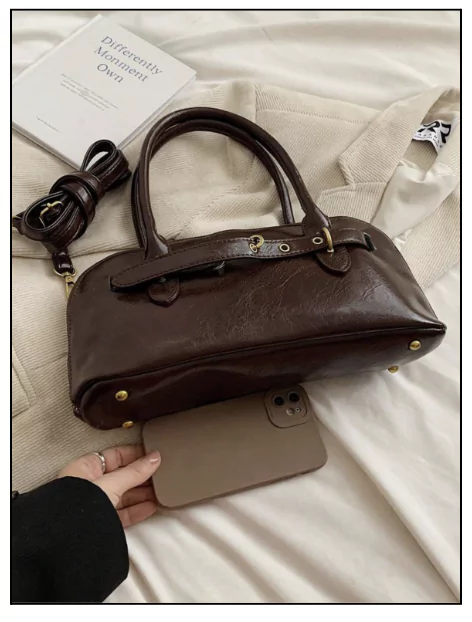
Close-ups for texture and details
Full shots to see the product in its entirety
In-use shots to show how it looks in action
If you can, invest a little time in styling. Think of setting your product in a real-life setting—add props if it fits! This way, buyers can envision how it’ll work in their lives.
And here’s a little insider tip: include a picture of the packaging box.
Studies show people are more likely to hit “buy” when they know the item’s coming in a neat, branded box!
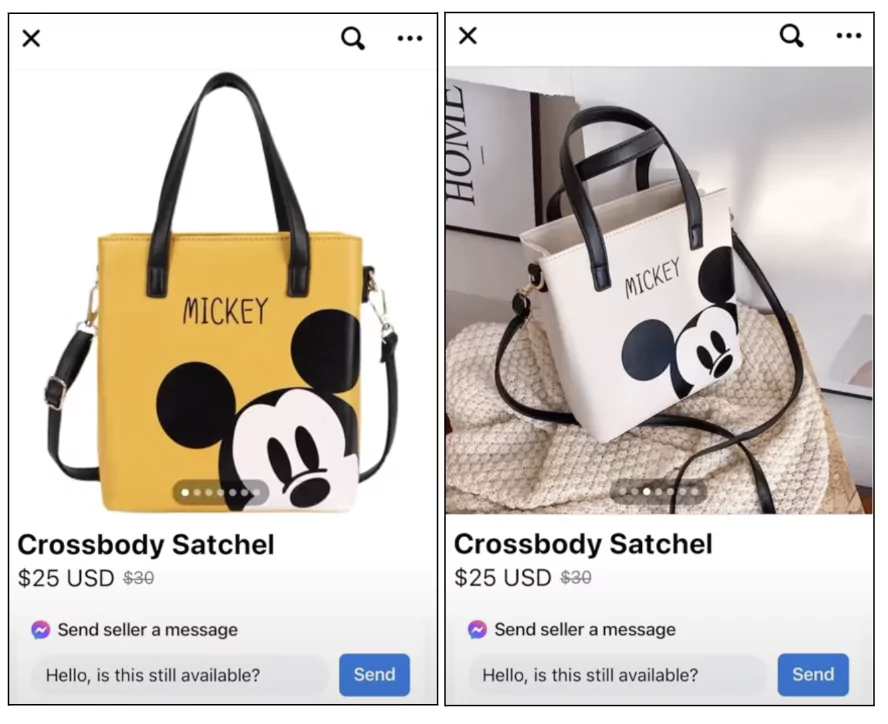
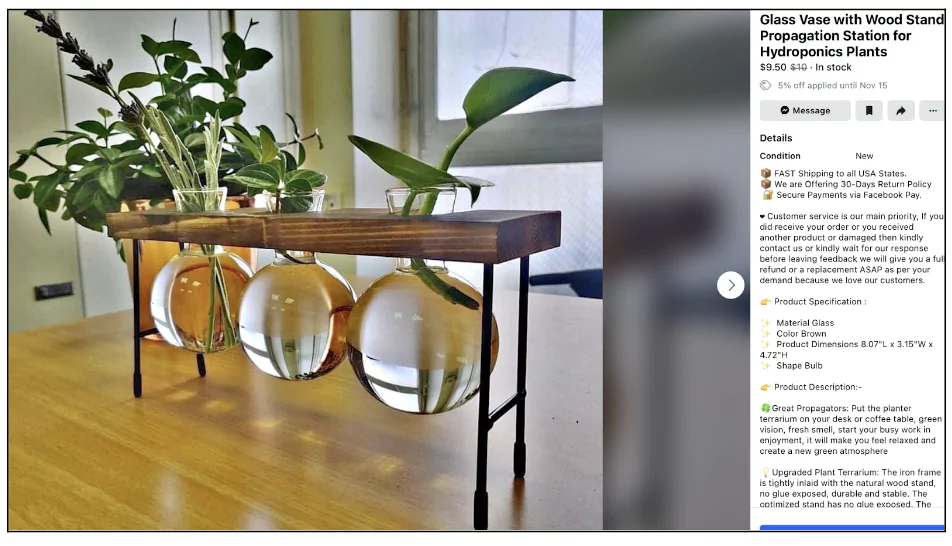
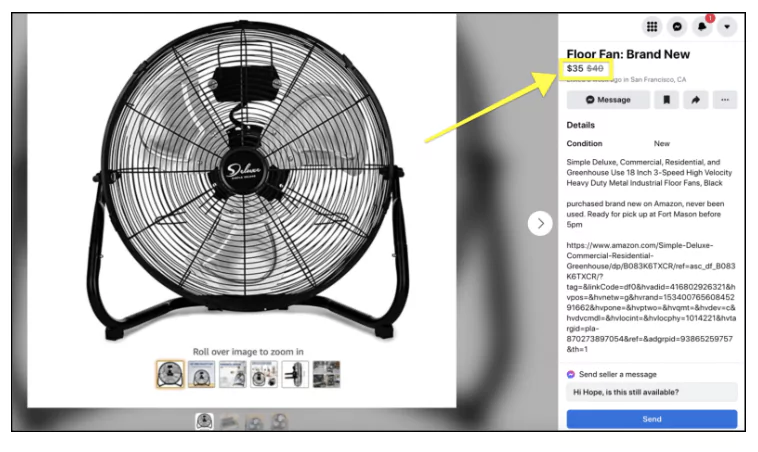
Here are some examples of great photos — something that can make selling on FB Marketplace a lot easier.
Finally, consider videos! They’re a fantastic tool for ramping up your listing’s engagement. Here are two surefire ways to go:
Unboxing videos to show off the packaging and product reveal
Demo videos to show it in action, helping buyers make confident choices
2. How to Write Facebook Marketplace Titles and Descriptions That Convert
Photos pull them in, but your title and description seal the deal. Think of them as your listing’s “closing pitch.”
The trick is to match how people search for items like yours on Facebook Marketplace.
Start by brainstorming what people might type if they’re looking for your item.
Let’s say you’re selling a mid-century modern coffee table. Instead of just “Coffee Table,” try something like “Mid-Century Modern Walnut Coffee Table – 36 Inches.”
This title is specific, which attracts serious buyers and gives them more confidence in what they’re clicking on.
To get the most traction, make a list of keywords people would likely search for, like:
Mid-century coffee table
Walnut wood coffee table
36-inch round coffee table
Coffee table with storage (if it has that feature)
Once you’ve got these search-friendly phrases, sprinkle them naturally into your title and description.
Next, add essential details to avoid a buyer’s “but wait, how big is it?” moment.
Make sure you include measurements (height, width, depth), the material, color, and any notable features like “easy assembly” or “scratch-resistant.”
If it’s vintage, mention that—it can be a huge selling point for furniture shoppers!
Lastly, don’t forget the extras! If you’re including items like a glass top or matching stools, or if there’s any option for delivery, list it. These small details can help you sell faster in a crowded Marketplace.
3. Best Times to Post on Facebook Marketplace for More Sales
When you post matters almost as much as what you post. You want your listing to go live when people are most likely scrolling through the Marketplace.
Prime times? Evenings and weekends! During these hours, people are winding down from work or relaxing, making them more likely to browse.
But here’s a pro tip: Experiment with different times and track what works best. For some categories, like furniture, you might see more activity on Saturday and Sunday mornings when people are in "home improvement" mode.
Some great posting times according to categories are:
Fashion and apparel: Wednesdays and Fridays, early mornings (7–9 AM) or evenings (6–8 PM)
Home and furniture: Saturdays and Sundays, late mornings to early afternoons (11 AM–1 PM)
Electronics: Tuesdays and Thursdays, afternoons (2–4 PM) or evenings (after 6 PM)
Baby and kids' products: Mondays and Wednesdays, late mornings (9–11 AM)
Beauty and skincare: Tuesdays and Saturdays, mid-afternoons (1–3 PM)
Automotive: Sundays and Mondays, evenings (5–8 PM)
Outdoor and garden: Saturdays and Sundays, mid-mornings (10 AM–12 PM)
And don’t forget: reply to messages ASAP!
You don't want them to change their minds.
4. How to Build a Trustworthy Facebook Marketplace Seller Profile
If you're wondering how to increase sales on Facebook Marketplace, consider greater consistency with your online store as a starting point.
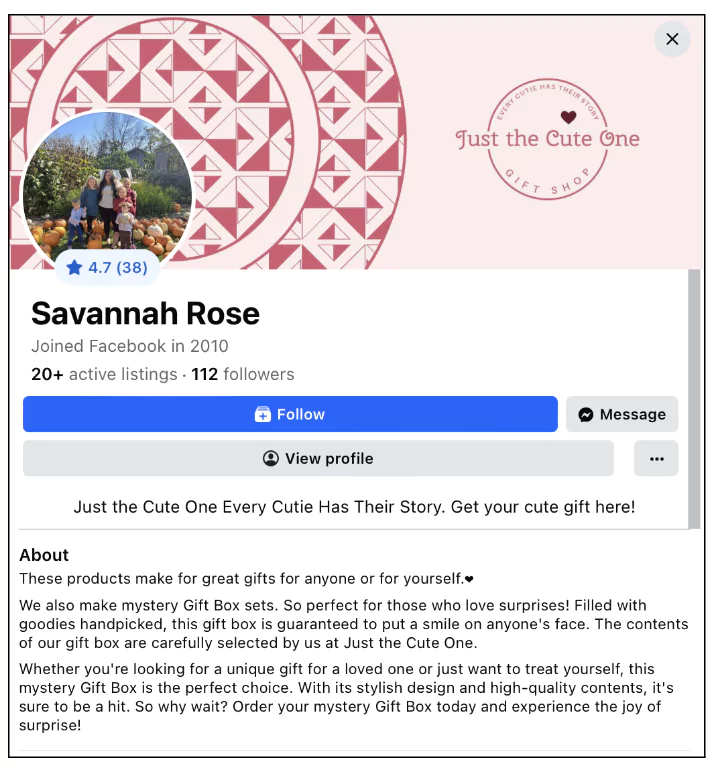
Use your official logo or a high-quality brand image as your profile picture. Avoid anything low-quality or makeshift—buyers should immediately recognize your brand and feel confident they’re shopping with a legitimate business.
Craft a bio that reflects the professionalism and personality of your brand–just like on your website
Try something straightforward and reassuring like, “Your trusted source for quality home goods, with fast shipping and excellent customer support.” This lets buyers know they’re dealing with an established business, not a casual seller
Include direct contact information, like your customer service email and phone number
And if you have a physical store, listing the address is a great trust signal and gives local buyers the option to stop by
Consistency between your website and Marketplace profile—same contact details, same tone—reinforces that they’re dealing with the real deal.
5. How to Handle Pickup and Delivery on Facebook Marketplace
Offering local pickup is a great way to appeal to buyers who want to skip shipping.
This is one of those FB Marketplace selling strategies that can work only when conditions are clear and simple.
Here’s how to do it right:
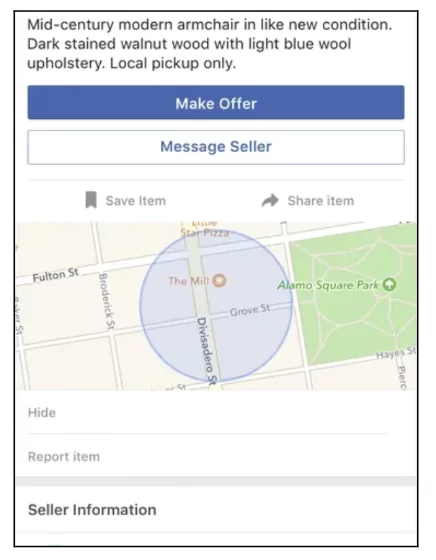
Add pickup details to every listing: Include your pickup address, store hours, and any procedures in the product description.
Use messenger to confirm logistics: Once buyers show interest, message them to finalize pickup times and clarify any specifics like payment methods or ID requirements.
Provide clear directions: Share a map link or step-by-step directions if your location is tricky to find.
Set clear expectations: Mention time limits for pickups or special instructions, like calling when they arrive.
Keep it hassle-free: Ensure pickup matches your brand’s tone—efficient and customer-friendly.
6. Facebook Marketplace Pricing and Negotiation Strategies
Be aware that people on Facebook Marketplace aren’t shopping for Picassos, they are looking for a deal.
That’s why you’ve got to be ready to negotiate.
Buyers love the thrill of getting a discount, so be prepared to haggle a bit.
This could be one of the FB Marketplace selling tips that helps you build traction over a period of time - because the more people refer, the more attention your listings receive.
Start with a buffer price: List your item slightly higher than your lowest acceptable price. This gives room for negotiation while ensuring you don’t lose value. For instance, if your couch is worth $200, list it at $230 to leave space for haggling
Use bundling to upsell: Offer a discount if buyers purchase multiple items together. For example, bundle a dining table with matching chairs at a reduced price instead of selling them individually. It makes the deal more attractive while moving more inventory
Highlight value over price: Focus on the benefits of your product. Instead of debating the cost, emphasize quality, condition, or extras like delivery options
Throw in freebies strategically: Sweeten the deal by adding low-cost extras. If you’re selling a bed, toss in an old comforter or unused pillows. This clears out inventory and feels like a steal for the buyer
Stay firm but friendly: Be polite but confident when declining lowball offers. For instance, respond with, “I’ve had several inquiries at this price, but I can offer a slight discount if you’re picking it up today.”
7. How to Turn Facebook Marketplace Buyers Into Repeat Customers
You don’t want your Marketplace sale to be a one-time wonder.
Give them a reason to visit your website next time with an exclusive promo code.
After a Marketplace sale, include a discount code in your follow-up message or thank-you note. This small incentive not only makes buyers feel valued but also opens the door for them to explore your full range directly on your site—where they’re more likely to buy again.
The trick is to make the offer enticing. Think “10% off your next order” or “Free shipping on your next purchase.” By doing this, you’re gently moving Marketplace customers to your own platform, where they can browse additional products and shop without the noise of competing listings.
8. How Often Should You Renew Facebook Marketplace Listings?
Renewing your listing every 7 days can significantly boost your product’s visibility on Facebook Marketplace. When you renew, your item gets bumped to the top of search results, giving it more exposure. But to maximize this FB Marketplace selling strategy, it’s important to do it at the right times and refresh your listings strategically.
Timing is everything: Renew your listings during high-traffic periods. Weekends and evenings are prime times when Facebook Marketplace sees increased activity. Aim for Friday evenings or Saturday mornings, right before the weekend shopping rush, to get the most visibility .
Make your listing fresh: A simple renewal might be enough, but consider tweaking your description or images to keep things relevant. For example, update a few product details or adjust pricing to reflect any new trends, especially before major shopping events like holidays or seasonal sales .some text
For fashion or seasonal items: Update images to showcase new styles or accessories that align with current trends.
For more permanent products (like furniture or electronics): Reword your listing to focus on new features, updated conditions, or added bonuses (such as free delivery or extra accessories).
Stay consistent: Stick to a regular renewal schedule to maintain your product’s position in search results, ensuring it doesn’t get buried by newer listings. Consider setting a reminder to refresh your listings on the same day every week.
Quick tip: During holidays or sales events, renew your listings right before the event starts and make sure your description mentions any related promotions. This not only boosts visibility but aligns your products with buyer intent.
9. Facebook Marketplace Shipping Best Practices for Sellers
Once you confirm the order, you must ship the item within 3 business days. This is crucial if you're applying this as one of your selling strategies on FB Marketplace. Facebook's system will automatically cancel the order if you don’t mark it as shipped, regardless of any prior agreements made with the buyer.
So, it’s not just about shipping the item on time; you also need to mark it as shipped and enter the tracking number in the system. This keeps both parties in the loop and ensures that the buyer has visibility on their order's progress.
Being proactive with this can help you avoid cancellations, maintain good standing as a seller, and keep your buyers satisfied with timely updates. Make sure to track these deadlines closely and provide the necessary information promptly!
A well-defined return policy isn’t just a safety net—it’s a selling strategy on Facebook Marketplace.
Here, where trust can make or break a sale, a clearly stated return policy reassures buyers that you’re a professional seller who’s ready to stand by your product.
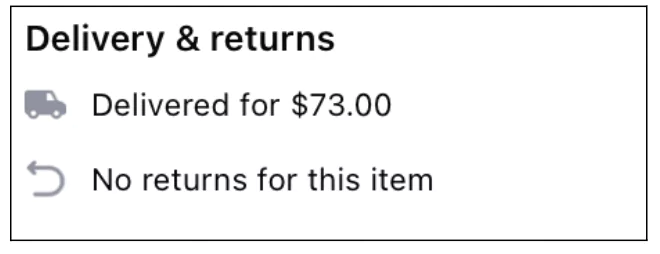
Be upfront about your terms: if you offer returns, explain the conditions, time limits, and any costs involved. If you don’t accept returns, let buyers know before they even ask.
The goal is transparency; buyers are far more likely to purchase when they know exactly what to expect if something doesn’t work out.
11. How to Promote Your Facebook Marketplace Listings
Once your FB Marketplace is set up, you need to get those eyeballs to your products.
First, consider sponsored listings. Sponsored listings work like ads, but they’re targeted specifically within the Marketplace, making them incredibly effective.
Facebook’s targeting tools allow you to narrow down your audience based on location, interests, and buying behavior, so your listing reaches exactly who you want.
With a small investment, you’re pushing your products up in the feed and gaining a competitive edge.
Next, run ads. These ads appear when people are casually browsing through their feed.
In this way, you are not limited to the Marketplace users, you can draw the attention of buyers from across the platform.
If you don’t want to invest in ads right away, no worries! Try using Facebook Live instead.
This is a great free way to connect with your potential customers in real time and answer their questions.
When hosting a Facebook live event be sure to have a plan for what it is that you want to talk about when you go live.
You should promote your event in advance and encourage people to tune in.
Lastly, dive into Facebook communities. These aren’t just groups; they’re vibrant hubs where your target audience hangs out.
Whether it’s local buy-and-sell groups or niche-specific communities, sharing your promotions here puts your deals right in front of the people who care most about your products.
Don’t just drop a link and ghost—engage with members, answer their questions, and build relationships. This will strengthen the way promotions help you sell on FB Marketplace.
Why visitors don’t trust your store within 3 seconds
Why shoppers can’t find what they’re ready to buy
What’s stopping 2-3x more shoppers from clicking “Add to Cart”
Where buyers hesitate right before purchase
Why high-intent shoppers still drop off
“The report was deep and super insightful. Can’t believe it’s free.”
Logan Christopher CEO, Empire Herbs
12. How to Get More Reviews on Facebook Marketplace
In the world of Facebook Marketplace sales strategies, reviews are pure gold.
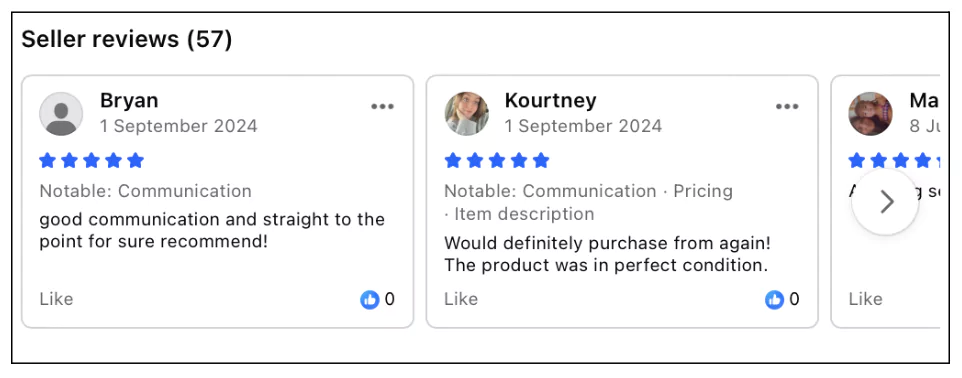
A solid profile with positive reviews signals to potential buyers that you’re trustworthy, reliable, and worth their time.
Encourage happy customers to leave reviews by giving them a smooth, friendly experience. A quick follow-up message thanking them and politely asking for feedback can go a long way.
Each review adds weight to your profile, showing future buyers that they’re dealing with a seller who’s proven to deliver quality and service.
13. Common Facebook Marketplace Scams Sellers Should Avoid
On Facebook Marketplace, a smooth sale can be thrilling, but it’s crucial to keep your guard up against scammers.
One quick rule of thumb: always check your account or PayPal balance before shipping anything. Don’t rely solely on a notification or message saying payment was sent. Confirm the funds are actually in your account to avoid any nasty surprises.
Scammers often try to create a sense of urgency or even fake payment confirmations, so take a moment to verify things on your end.
A few seconds of caution can save you from potential headaches—and costly losses. And if anything feels off or too good to be true, trust your instincts. It’s far better to delay shipping than to risk sending your product to someone who hasn’t paid.
14. How Fast Customer Support Improves Facebook Marketplace Sales
Accessible customer support is essential to building trust and turning potential buyers into committed ones. Here’s how to leverage support as a clear, responsive, and effective FB Marketplace selling strategy:
Visible contact options: Ensure your contact details (Messenger, email, phone) are clearly visible in your listings, profile, and product descriptions. Buyers should easily know how to reach you with questions.
Quick, friendly responses: Set up notifications so you can reply as soon as possible. The faster you respond, the more likely a simple inquiry will turn into a sale.
Self-help resources: Consider adding an FAQ section or a knowledge base where customers can find answers to common questions. This will reduce the number of inquiries and speed up the buying process.
Set clear expectations: Let customers know when to expect a response (e.g., “I reply within 24 hours” or “Available from 9 AM–6 PM”). Transparency in response time builds trust.
Easy returns and exchanges: If applicable, outline a clear, hassle-free return policy. Knowing they can easily return or exchange items will give customers more confidence in their purchase.
Selling on Facebook Marketplace is a bit of a waiting game, and timing is everything.
Buyer interest can fluctuate with the seasons, holidays, and even trending events, so don’t sweat it if your listing isn’t an instant hit. Some audiences only become active during certain times of the year or when they’re hunting for deals around big sales periods.
Keep your listings live, update them regularly, and wait for the right moment.
You might see more traction during back-to-school season, the holiday rush, or even just as the weather changes.
Patience can really pay off here—often, the key is letting your product sit long enough to catch the wave of demand when it hits.
16. How to Combine Facebook Shop and Marketplace to Increase Sales
In 2026, when you’re considering selling on FB marketplace strategies, setting up an FB shop will be non-negotiable.
The reason is simple but often under-discussed: Marketplace and Shop offer different advantages to eCommerce businesses.
On FB Marketplace, ready buyers and impulse buyers are more on the lookout.
But it misses out on compounding the interest of those who’re not ready to buy but will soon — as long as they feel nurtured.
This is where your FB Shop can step in and elevate the game.
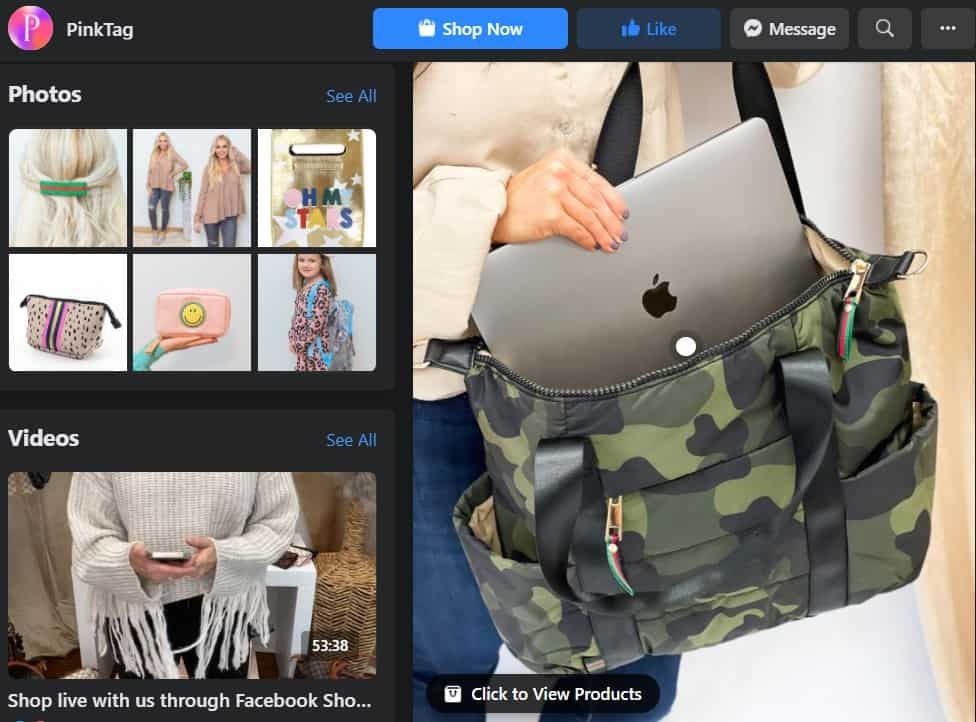
Like it has for PinkTag Boutique, a small woman-run eCommerce business, which was even featured by an FB study. PinkTag not only opened a Shop alongside Marketplace listings but also began leveraging product tags across ads and stories.
In addition, they also actively use the Live Shopping feature and ease the payment process through Facebook checkout.
The FB Marketplace Conversion Checklist
Before publishing any listing, you must check:
a. Is the first image understandable in under 2 seconds?
b. Does the title match the search language?
c. Did you mention the dimensions?
d. Did you explain pickup logistics?
e. Did you reduce negotiation anxiety?
f. Did you mention how returns work?
g. Did you include trust signals?
h. Did you explain delivery timing?
i. Did you add urgency messaging?
j. Did you include real-condition visuals?
Let's double your conversions
98% of visitors who visit an eCommerce site—drop off without buying anything.
Why: user experience issues that cause friction for visitors.
And this is the problem Convertcart solves.
We've helped 500+ eCommerce stores (in the US) improve user experience—and 2X their conversions.
How we can help you:
Our conversion experts can audit your site—identify UX issues, and suggest changes to improve conversions.
Subscribe for more articles like this!
Thank you - we'll see you in your inbox soon!
Oops! Something went wrong while submitting the form.
Read by 5000+ ecommerce store owners
Subscribe for more articles like this!
Thank you - we'll see you in your inbox soon!
Oops! Something went wrong while submitting the form.







.avif)
.svg)


.svg)

.svg)
.svg)
