How Do You Reduce Friction on Your eCommerce Store?
eCommerce friction is anything that makes buying slower, harder, or less certain. To reduce it, audit your site stage by stage: arrival, consideration, checkout, and whatever happens after the sale. Based on 500+ CRO audits, the biggest conversion losses rarely come from one catastrophic problem. They come from several smaller friction points compounding across the journey. Use the 49-point checklist below to find them.
After auditing more than 500 eCommerce stores, we've noticed a pattern that never quite makes it into other "reduce friction" guides.
What 500+ CRO Audits Taught Us About Friction
Nobody's conversion problem ever comes down to one broken thing.
Every real lift we point to in this piece took three separate fixes working together, never a single big redesign.
Before we get into the checklist, here's a quick look at the real stores behind that pattern, all public case studies, so you can check them for yourself.
Apliiq: homepage and navigation fixes, 69.28% site-wide conversion improvement
Every case study listed above tells the same story: three fixes.
Apliiq's conversion lift came from three separate fixes, an above-the-fold redesign, a navigation repair, and a discount matrix surfaced at checkout.
Fastenere needed search, trust badges, and mobile navigation correction.
Squatty Potty stacked a CTA fix on top of an image fix on top of a social proof fix, and each one added to the last instead of replacing it.
Three isn't a coincidence at this point, it's the pattern.
We've started calling it FRICTION TAX: each small annoyance barely registers on its own, a search bar that's slightly hard to find, a shipping cost that shows up a beat too late, a button that needs one extra scroll to reach.
None of them alone is dramatic enough to send someone away. It's the second and third one stacking on top of the first that actually costs you the sale.
The Pattern We Keep Seeing
Conversion problems cluster. Here's how we've come to think about it, based on what we keep seeing across audits, not a threshold we've measured to the friction point, but a pattern that's held up in every case study in this piece.
One friction point: mostly just an inconvenience. Shoppers absorb it and keep going.
Two friction points: real hesitation sets in. The shopper starts second-guessing the purchase.
Three or more friction points: this is where we've seen it tip into abandonment, every time.
So if you fix the single loudest item on this checklist and nothing much changes, that's not a sign the checklist is wrong. There are still two more friction points quietly collecting their share.
That's what the 49 checks below are actually for, not just fixing individual problems, but finding the cluster.
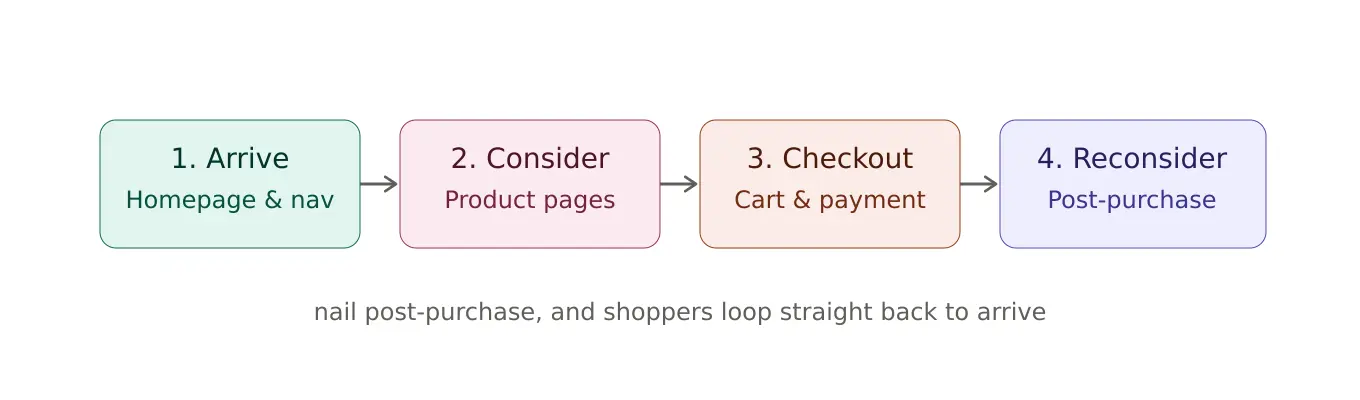
We built them around the same four-stage path every shopper takes.
Here's How We Spot Friction When We Audit eCommerce Stores
We start every audit the same way: map the shopper's path into four stages, then hunt for friction in each one.
Arrive covers the homepage and navigation, the part where someone decides whether your site is worth exploring further.
Consider covers listing and product pages, where casual browsing turns into genuine buying intent.
Checkout is the cart and payment flow, where that intent either survives contact with your forms or doesn't.
Reconsider picks up everything after the sale, the point where a customer either feels good about what they bought or starts quietly wondering if they made a mistake.
All 49 checks below sit inside one of these four stages, numbered in the order they actually show up along the way.
I. Arrive: Where Shoppers Decide to Stay
1. Does your homepage instantly clarify what you sell and why it matters to the visitor?
Many sites bury their purpose under vague slogans, forcing visitors to hunt for basic information.
Example: We'd swap "Elevating Your Journey" for something like "Waterproof Hiking Boots for Rugged Trails" next to a "Shop Now" button, plain enough that nobody has to translate it.
2. Are you hiding your best-selling categories behind a "Shop All" button that requires extra clicks?
Forcing visitors to dig through a generic menu to find what they want is a classic source of friction.
Display your top three categories directly on the homepage with clear, high-quality images that serve as visual shortcuts.
Evidence from our audits: We found Apliiq's top-converting pages sitting five to seven scrolls deep, with no visible path to them from the homepage.
Once we brought those pages into the first scroll, they pulled in 50% more traffic and added roughly $5,590 a month in revenue.
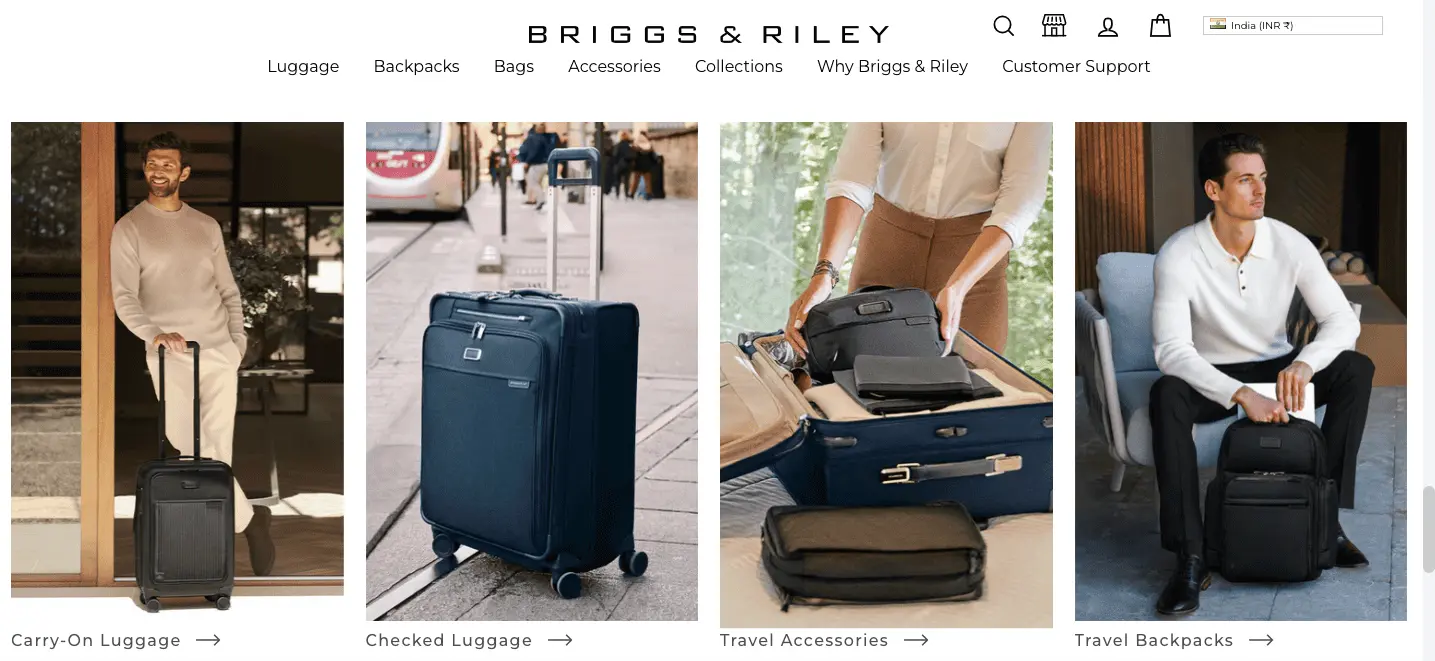
We like Briggs & Riley's approach too, carry-ons, checked bags, and travel accessories as large tappable blocks instead of one buried link.
3. Does your hero image take so long to load that visitors are staring at a blank void?
A massive, unoptimized banner image can turn your homepage into a graveyard of lost traffic before anyone reads a word.
Use modern image formats and lazy-loading. Our default target is under two seconds for above-the-fold content, though the real number varies by category and traffic source.
Example: We usually tell clients to swap a 5MB high-res JPEG for a compressed WebP file, a small change that makes the page feel snappy on mobile connections.
4. Is your search bar a tiny, microscopic icon that's impossible to find on a busy screen?
Shoppers who use search are often your highest-intent buyers, yet many sites hide the search bar as if it's a secret. Make it prominent, centered, and wide enough to notice instantly.
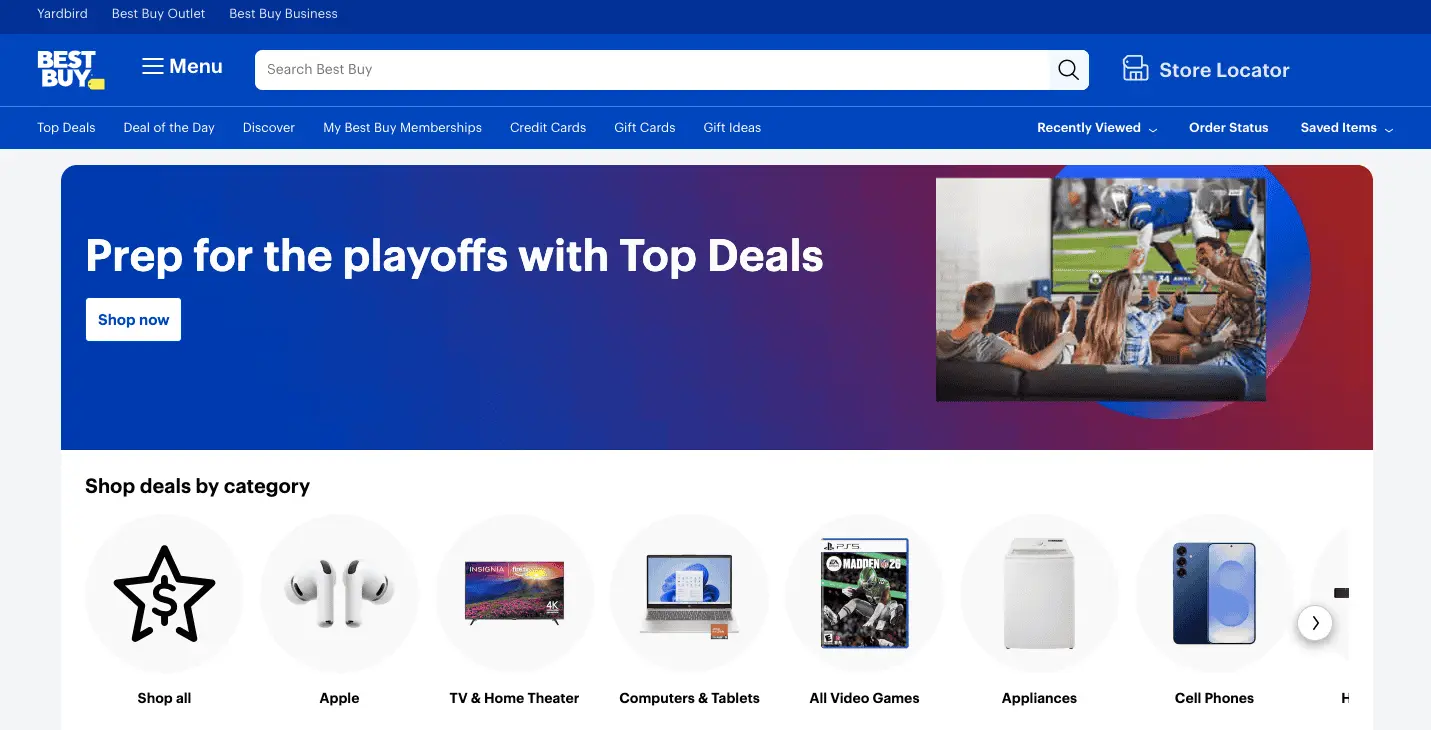
Evidence from our audits: We like how Best Buy runs a full-width search bar with the placeholder text "Search Best Buy" front and center.
We saw what happens without one at Fastenere: barely 1% of visitors touched search at all.
Once we added smarter filtering and predictive suggestions, that number only grew to about 3%, yet that small group converted over 1,100% better and drove nearly 20 times more revenue per user than everyone else on the site.
5. Are you bombarding new arrivals with a sign-up pop-up before they've even seen your logo?
Interrupting a visitor's first three seconds with an aggressive discount offer creates immediate psychological friction.
Time pop-ups based on exit intent or after the visitor has actually browsed a few products.
Example: We tell clients to wait until a shopper has viewed three products before offering a 10% discount in exchange for their email address.
6. Do you use industry jargon in your headlines that requires a specialist to decode?
"Internal Technical Solutions" instead of "Better Ways to Work" creates a cognitive barrier that slows down the buying process.
Use the exact language your customers use when describing their problem.
Example: In our tests, a plain, benefit-led line like "Fix Dry Skin" tends to outperform something like "Advanced Epidermal Hydration Matrix" almost every time.
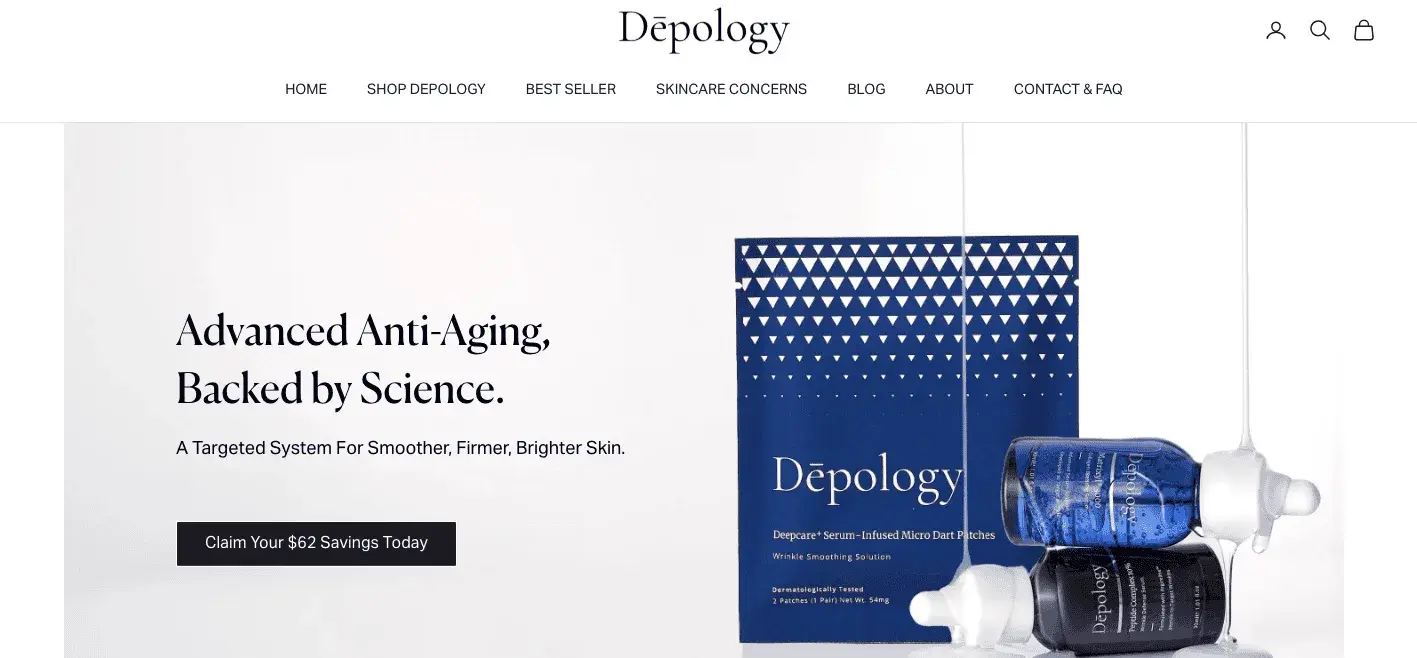
We like how Depology leads with a direct, science-forward claim instead of clinical terminology.
7. Is your primary call-to-action competing with four other buttons of the same color?
When everything is highlighted, nothing is highlighted, and the visitor is left to make a decision you should have made for them. Use a high-contrast, unique color for your primary button.
Example: We usually recommend one bright, unmistakable button color for the main "Shop Now" path, especially on an otherwise monochrome site.
8. Is your logo linked back to the homepage, as every visitor expects it to be?
This is the most basic rule of navigation, and it's still the one an "experimental" redesign breaks most often. Make sure tapping the logo always returns the visitor to the homepage.
Example: We check that the centered logo doubles as the "Home" anchor on every single page, every audit, no exceptions.
⚠️
Find out what's stopping your store visitors from buying
Product discovery – barriers that prevent shoppers from finding items
Category/collection pages – improvements that drive deeper product exploration
Product page – what to optimize to convert 2–3x more buyers
Cart – ways to ease hesitation and speed up purchase decisions
“The report was deep and super insightful. Can’t believe it’s free.”
Logan Christopher CEO, Empire Herbs
9. Are your category labels written in clear, everyday English?
Using "Artisanal Vessels" instead of "Cups & Mugs" confuses shoppers and adds friction for no real benefit. Stick to the words your customers actually use.
Example: We tell clients to use "Tools" and "Hardware" instead of "Implementation Devices," the words shoppers actually type.
10. Is your cart icon missing a quantity count, leaving shoppers guessing whether the item was added?
Without it, shoppers who aren't sure their click registered will often just click "Add to Cart" again, resulting in accidental duplicate orders.
Example: We like to see the cart icon turn red and display "3" the moment a third item gets added, a small detail, but it closes the loop for the shopper.
11. Do you have a sticky header that keeps navigation and search accessible at all times?
Forcing a shopper to scroll all the way back to the top just to search again is a needless barrier.
Example: We push for a search bar and cart that stay visible no matter how far down the visitor scrolls, especially on long-form, blog-style stores.
12. Are your breadcrumbs missing, making it hard for shoppers to jump back one level?
Breadcrumbs let shoppers broaden their search instantly when the specific product they landed on isn't quite right.
Example: We want a shopper to be able to jump from a "4-Person Tent" page back to "Tents" in a single tap, not three.
13. Does your footer contain the essential, unglamorous links like returns, privacy, and shipping?
Experienced shoppers look for this information to verify a brand's legitimacy, and hiding it is a quiet way to lose their trust.
Example: We recommend a dedicated "Customer Service" footer column, with links to "Track Order" and "FAQs" that are actually easy to find.
14. Is your contact page hidden behind three levels of help center articles?
If a customer has a problem, making them work to find a human being is a reliable way to earn a bad review.
Example: We recommend keeping a "Talk to an Expert" button visible on every page, especially for higher-end brands, where that shopper wants a human, fast.
15. Does your site jump around while loading, causing shoppers to tap the wrong thing?
Layout shift is a frustrating, easy-to-miss form of friction that occurs when slow-loading images push content down mid-tap.
Example: We use image placeholders that reserve space in advance, so buttons stay exactly where the shopper expects them.
16. Is your mobile menu a giant, overwhelming list that takes three levels of tapping to navigate?
A mega menu built for a 27-inch monitor turns into a maze on a six-inch screen.
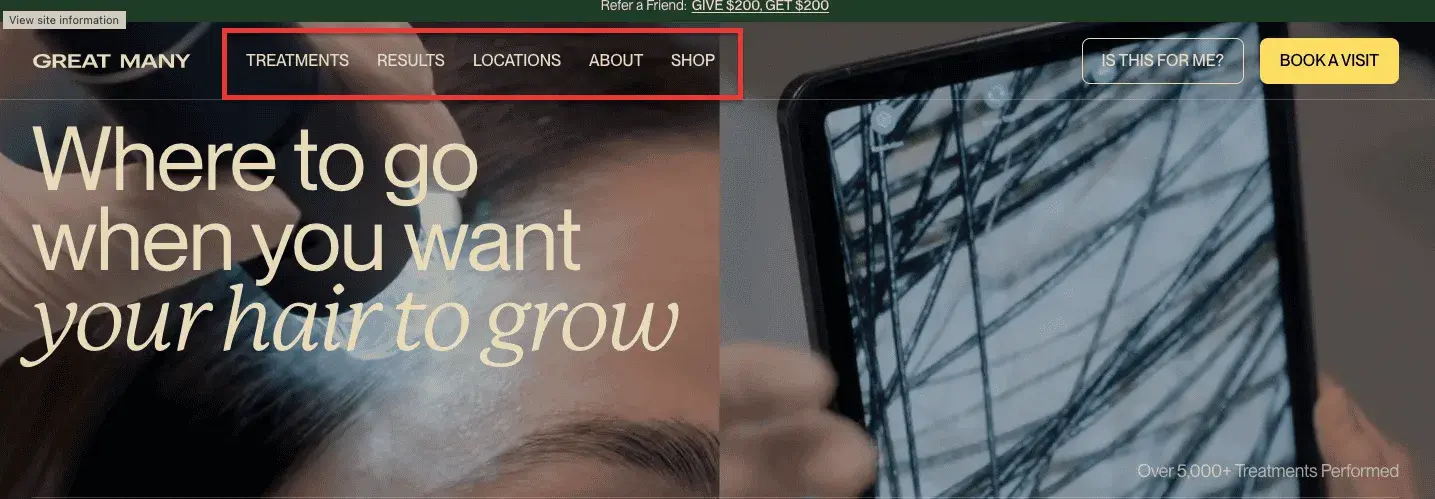
Example: We like how Great Many keeps its mobile menu to five plain-language categories, Treatments, Results, Locations, About, Shop, instead of a sprawling desktop-style menu.
II. Consider: Where Browsing Becomes Buying Intent
17. Are your filters so complex they feel like a university entrance exam?
Overloading a shopper with forty sidebar options can turn a simple search into an exhausting chore.
Example: For shoe stores, we usually default to "Size" and "Color" and hide "Heel Height" and "Lace Type" under an advanced tab.
18. Does clicking "Quick View" take the shopper to a completely different page?
Quick View should give a snapshot of product info without breaking the shopper's flow on the listing page.
Use a modal overlay that lets them add to cart and return to browsing instantly.
Example: We build these as a small overlay, so something like a lamp opens in place and the shopper gets back to the catalog with one click.
19. Are you missing stock status indicators, leading shoppers to click on items that aren't available?
There's nothing more irritating than finding the perfect item only to see "Sold Out" once the product page loads.
Example: We use a red "Last Few Left" tag while clearly graying out sold-out sizes, so nobody clicks into a dead end.
20. Does your sort feature actually work, or does it just refresh the page into a random order?
A broken sorting mechanism is a major source of friction, and it makes a site feel amateurish and untrustworthy.
Example: We recommend sort options like "Price per Ounce" for grocery clients, so shoppers can find the best value quickly.
21. Is your infinite scroll breaking the footer, making it impossible to reach your contact information?
Infinite scroll keeps people browsing, but it can trap shoppers who are trying to find your shipping or returns links.
Example: We usually cap it with a "Show More" button after every 24 items, so the footer stays reachable.
22. Are your product images so small that shoppers can't see the texture or details?
Tiny thumbnails force shoppers to click into every single listing just to see what an item actually looks like. Use large, clear grid layouts with a secondary hover image.
Evidence from our audits: We found Squatty Potty's product images stacked one below another, adding friction to every scroll.
Once we swapped that layout for a responsive image carousel, it alone produced 60 additional transactions in thirty days.
23. Do you provide a "Clear All" button for active filters, or must shoppers uncheck every box manually?
Forcing a shopper to click six different "X" marks to reset their search is a needless waste of their time.
Example: We build a single click to reset a narrowed-down "Laptop Specs" search, instead of six boxes to uncheck by hand.
24. Is your "Add to Cart" button hidden below the fold, requiring a long scroll to find?
If a shopper is ready to buy, they shouldn't have to hunt for the trigger. Use a sticky Add to Cart bar that follows the shopper as they scroll on mobile.
Evidence from our audits: When we moved Squatty Potty's add-to-cart button above the fold, aligned horizontally with related actions, it produced a 7% increase in converting users and 65 additional orders.
25. Are you missing a size guide or fit finder, leaving shoppers guessing whether the item will actually fit?
Uncertainty is the enemy of conversion and a major driver of cart abandonment.
Example: We recommend a "Find Your Fit" quiz for denim clients, one that suggests a size based on height and weight.
26. Does your shipping information require a zip code before it shows a price?
Hiding shipping costs until the final checkout stage is a leading cause of cart abandonment.
Evidence from our audits: We added a real-time shipping countdown for Gloves.com, showing exactly when an order needed to be placed, and it lifted completed orders by 22%.
27. Are your product videos set to auto-play with audio that startles the shopper?
Sudden, unexpected sound is an aggressive form of friction that often leads to an immediate exit. Mute video by default and let the shopper choose to unmute.
Example: We recommend looping, silent "Product in Action" clips for kitchen appliance clients, audio only plays if the shopper clicks.
28. Do you use low-resolution photos that blur when the shopper tries to zoom in?
If a customer can't see the stitching quality or the fabric's texture, they usually won't buy. Use high-resolution, multi-angle photos with a real zoom feature.
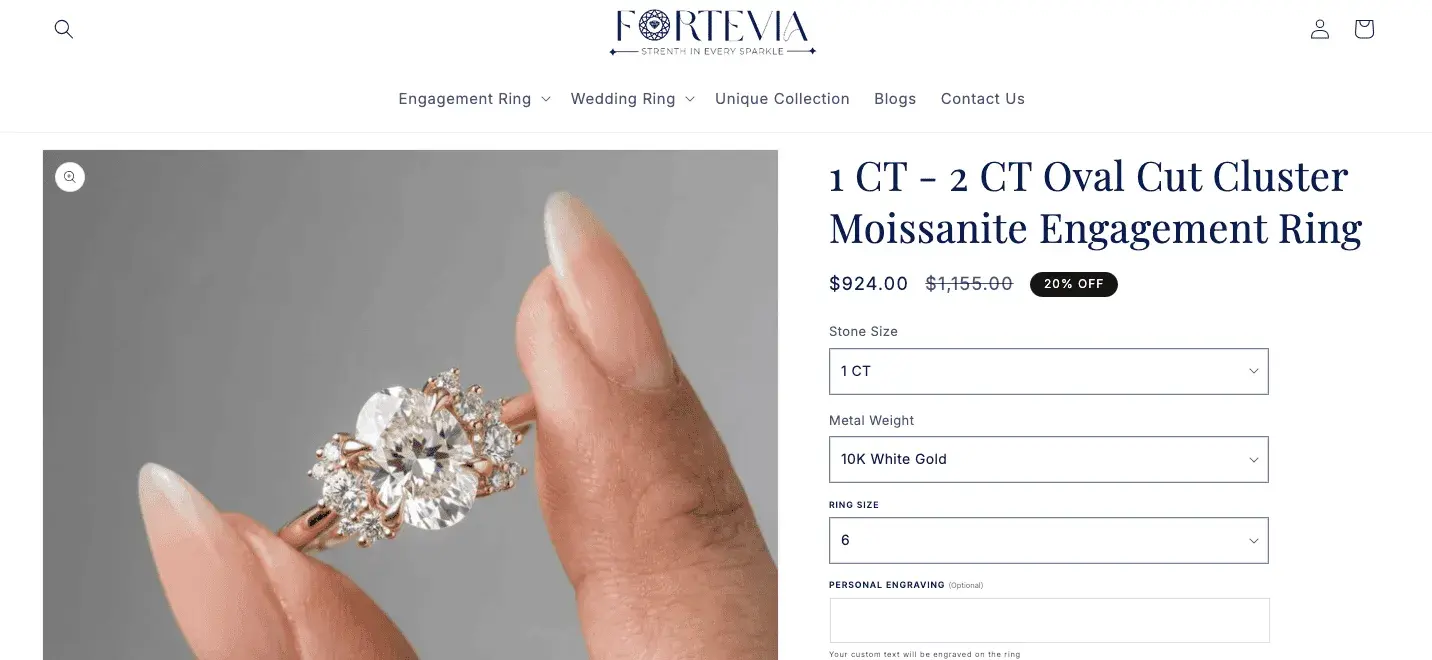
Example: We like how Fortevia lets shoppers zoom in close enough to see individual stones and the finish on a ring, right down to the metalwork.
29. Is your social proof buried at the very bottom of a long, rambling page?
Reviews are most effective when they're visible during the decision-making moment, not after a shopper has already scrolled away.
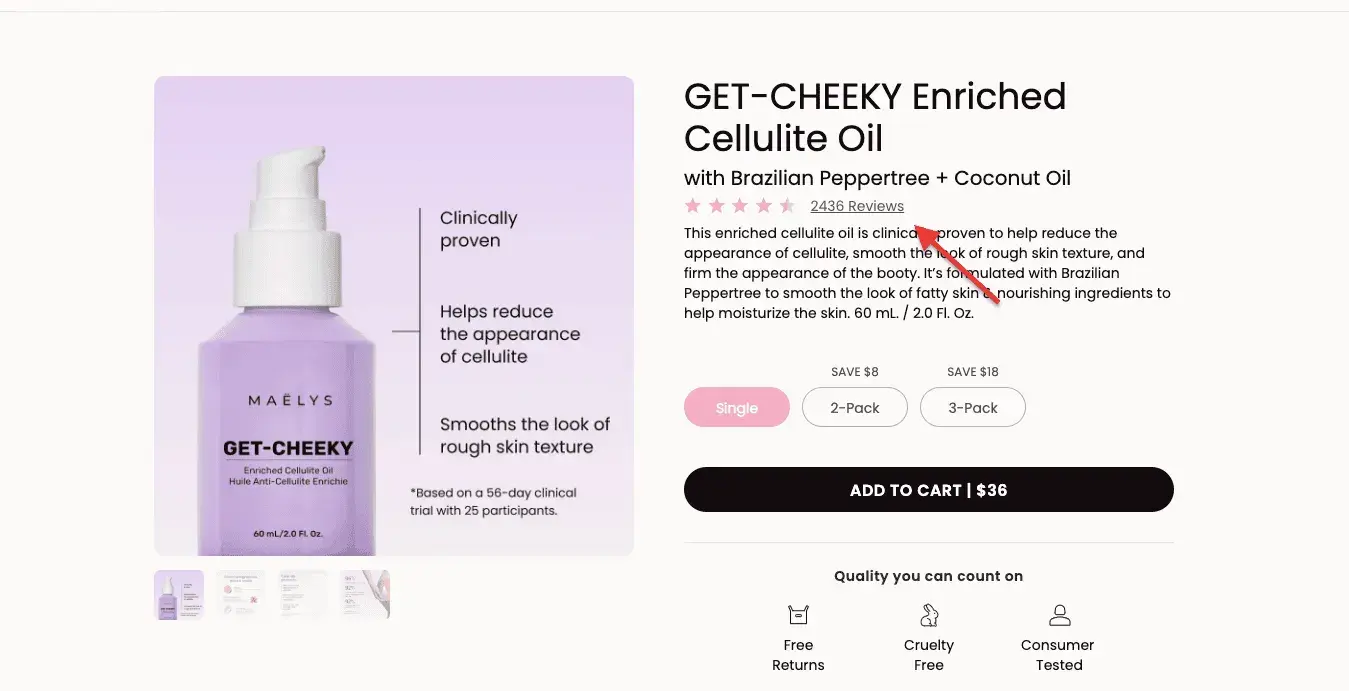
Evidence from our audits: We like how Maelys displays "4.8/5 Stars, 2,436 Reviews" directly under the product title, right next to the price.
At Fastenere, we found close to 90% of shoppers were unsure about product reliability, so we added visible quality badges, which pushed conversion up 172% across devices.
At Hubman & ChubGirl, we saw orders climb 78% on desktop and 103% on mobile from visible trust cues alone.
30. Are you missing related products or "Frequently Bought Together" bundles?
Not showing relevant alternatives can lead to a dead end if the shopper's first choice isn't quite right.
Evidence from our audits: We've suggested "Waterproof Socks" and "Hiking Poles" on a "Hiking Boots" page for outdoor clients.
In a similar spirit, we added a social proof banner surfacing popular items on Squatty Potty's site, and it brought in 1,795 additional transactions and just under $70,000 in revenue.
31. Are your buttons too small for a human thumb to tap accurately?
Designers often forget that a mouse click is precise but a thumb tap isn't. Make every button at least 44 by 44 pixels.
Example: We keep "Add to Cart" and "Wishlist" as large, clearly separated buttons on mobile, so a thumb doesn't have to be precise.
32. Do you use hover effects that don't work on touchscreens?
Relying on mouse-over to reveal product info is a dead end for mobile shoppers, since there's no hover to trigger.
Example: We replace hover with a left swipe on fashion product photos, so the garment's back shows up without waiting for a hover that will never come.
33. Are you using full-screen overlays that are impossible to close on a small screen?
If the close button on a pop-up is hidden off-screen or too small to tap, the shopper is effectively trapped.
Example: We always add a large, visible "No thanks, I'll pay full price" link at the bottom of a mobile discount pop-up, easy to find, easy to dismiss.
⚠️
Find out what's stopping your store visitors from buying
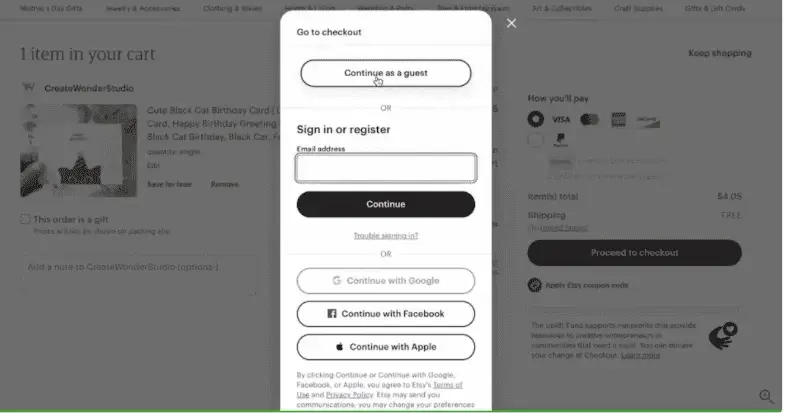
Evidence from our audits: We made guest checkout the default for a direct-to-consumer beauty brand, added address autocomplete, and removed anxiety-inducing "Next" buttons at every step.
Together, those changes produced an 18% jump in completed transactions.
35. Is your discount code box so prominent that it sends shoppers hunting for coupons elsewhere?
A giant, empty promo box nudges shoppers to open a new tab and search "coupon codes," where they often get distracted or land on a competitor's site.
Example: We keep the promo field collapsed behind a small "Have a code?" link for electronics clients, so only shoppers who already have one go looking.
36. Do you wait until the very last step to show the final total, including taxes and fees?
Sticker shock at the final click is one of the more avoidable ways to lose a sale you'd already won.
Example: For subscription clients, we show the total monthly cost on every screen of the checkout flow, not just the last one.
37. Does your form lack autofill, forcing shoppers to type their address manually?
Manual typing on a mobile device is one of the more thankless things we ask customers to do.
Example: We set up flower-delivery checkouts so typing a street name automatically fills in the city, state, and zip code.
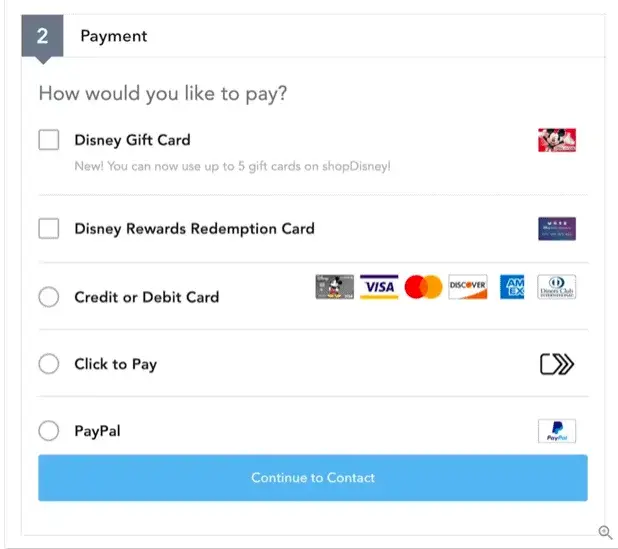
38. Are you missing digital wallet options like Apple Pay, Google Pay, or PayPal?
Forcing a shopper to find their physical card while lying in bed is an unnecessary barrier at the exact moment they're ready to buy.
Evidence from our audits: We streamlined Extreme Tactical Dynamics's desktop and mobile checkout and added trust seals at the exact moments doubt tends to creep in. That cut checkout abandonment by 11%.
39. Is your progress bar missing, leaving shoppers wondering how many steps are left?
Uncertainty about the length of a task leads to abandonment. A clear indicator, like "Shipping, Payment, Review," keeps the shopper grounded.
Example: We use a simple "1 of 3 Steps" marker at the top of the checkout screen for clothing clients, nothing fancier is needed.
40. Do you ask for a phone number or birthday without explaining why you need it?
Unnecessary personal questions trigger suspicion at the worst possible moment.
Example: For wine club clients, we add "Required for age verification" next to the date-of-birth field, just to clarify the intent.
41. Is your keyboard optimized for the data being entered, like a number pad for zip codes?
Forcing a shopper to switch from letters to symbols just to enter a card number is a needless annoyance.
Example: We set up checkout forms to trigger the numeric keypad automatically the moment a shopper taps the card number field.
42. Does your checkout require pinching and zooming to see the form fields?
A non-responsive checkout is one of the most reliable ways to kill mobile conversions.
Example: We build checkout forms so fields stack vertically and fill the width of the phone screen, no horizontal scrolling required.
IV. Reconsider: Where the Purchase Gets Confirmed or Regretted
43. Does your order confirmation page lack a clear order number and summary?
The moment right after purchase is one of high anxiety, and a bare "Success" message without detail leaves the shopper wondering if anything actually happened.
Example: We like writing confirmations along the lines of "Order #12345 Confirmed, We're Roasting Your Beans Now!", specific enough to feel real.
44. Are you making shoppers wait more than five minutes for their email receipt?
A delayed confirmation email leads to "did it actually work" panic and unnecessary support tickets.
Example: We set up digital software checkouts to send the license key and receipt within 30 seconds of payment.
45. Is tracking a package a manual process of copying long numbers into a carrier's site?
Forcing the shopper to leave your ecosystem to track an order is a missed opportunity to keep them engaged.
Example: We send "Out for Delivery" texts with a direct map link, right inside the client's own ecosystem, not a carrier's.
46. Does your packaging include a return label, or must the customer print one themselves?
Printing a label is a real barrier for the many customers who don't own a printer.
Example: We recommend a "No-Hassle Return" sticker with a pre-printed label inside every box, especially for shoe retailers.
47. Are you upselling too aggressively in the confirmation email before the first order has even arrived?
Asking for more money before you've delivered the first product can feel greedy and trigger buyer's remorse.
Example: We'd rather send something like a "How to Keep Your New Fern Alive" guide two days after purchase, instead of another sales pitch.
48. Is your review request sent before the product has actually been delivered?
Asking a customer to review something they haven't received yet is an unnecessary insult.
Example: We usually wait 14 days after delivery to request a review, giving the customer time to actually try the product.
49. Is it impossible to cancel or edit an order within the first 30 minutes of placing it?
Mistakes happen, and forcing a customer to call support to fix a typo in their address is needlessly frustrating.
Example: We recommend a 60-minute grace period, enough time to change the shipping address or add an item to the order.
Which Friction Should I Fix First?
Forty-nine checks is a lot to stare at once. If you've just found ten or more empty boxes, don't start at number one and work down the list in order, that's the checklist equivalent of alphabetizing your to-do list.
Instead, weigh each one against four things.
Revenue proximity: How close is this friction point to the actual transaction? A confusing checkout field costs more per shopper than an awkward footer link, simply because fewer people ever reach checkout without already wanting to buy.
Shopper exposure: How many people actually hit this friction point? A mobile-only bug matters less on a site where most traffic is desktop, and more on one where it isn't.
Severity: Does this stop someone cold, or just slow them down? Forced account creation stops people outright. A slightly plain headline just nudges them to keep scrolling.
Implementation effort: Some fixes take an afternoon. Others need a full sprint. All else being equal, take the afternoon fix first, since early wins tend to buy you room for the harder ones.
Weigh those four against each other, even just roughly, and the highest-scoring items are where the friction tax is actually being collected.
Found 10 or more empty boxes? Start with checkout: In our audits, checkout-stage friction, points 34 through 42, consistently scores highest on revenue proximity and severity combined, since every shopper who reaches checkout has already decided to buy.
Losing them there is the most expensive kind of friction there is. Fix that stage first, then work backward toward Consider and Arrive.
Where to Start
Friction rarely looks dramatic from the inside. It's a form field nobody questioned, a button that's technically visible, a checkout that works fine on your laptop.
Run through the 49 checks above, then use the prioritization method to decide what to fix first.
The stores we've audited that recover the most revenue aren't the ones chasing a single big redesign, they're the ones who go after the whole cluster.
Friction is anything that slows a shopper down or makes them second-guess a purchase they were otherwise ready to make: a slow-loading page, a forced account creation, a confusing menu, a fee that shows up out of nowhere at checkout.
The gap between wanting to buy and actually being able to buy easily, that's where it lives.
What Causes Checkout Friction Specifically?
Usually, it's asking for more than necessary. Extra form fields, a forced account, a total that only appears on the final screen, slow loads, missing payment options, shipping costs nobody saw coming.
Each one gives a shopper a reason to hesitate at the exact moment they were closest to buying.
How Can a Store Identify Friction Points Quickly?
Start with a five-second test on the homepage. Can a stranger tell what's being sold and how to buy it before the clock runs out?
From there, try a mobile-only purchase somewhere genuinely distracting, on a bus, in line for coffee, and most of the obvious problems surface fast.
Analytics that show drop-off by funnel step, paired with a few session recordings of real users, tend to fill in the rest.
How Does Friction Affect Returning Customers Differently Than First-Time Buyers?
A returning customer already trusts the brand, so friction that shows up a second or third time reads less like a glitch and more like carelessness.
Hit the same slow checkout or the same confusing filter twice, and a lot of people just quietly stop coming back.
What Metrics Matter Most for Measuring Friction?
Cart abandonment rate and time to complete checkout are the two most direct signals.
Rage clicks, where someone taps a dead element over and over, and bounce rate segmented by page speed usually point the same direction.
Cross-reference those against support tickets, and it gets pretty clear which friction points are actually costing revenue.
Subscribe for more articles like this!
Thank you - we'll see you in your inbox soon!
Oops! Something went wrong while submitting the form.
Read by 5000+ ecommerce store owners
Subscribe for more articles like this!
Thank you - we'll see you in your inbox soon!
Oops! Something went wrong while submitting the form.






.avif)
.svg)


.svg)

.svg)
.svg)
