
.avif)


A store adds a third-party testing tool. Someone installs the snippet, points it at a few pages, and moves on.
It works fine on the homepage. Nobody goes back and checks what it's specifically doing on checkout, the one page in the entire funnel where a shopper has already decided to buy and is one slow moment away from changing their mind.
This is a real gap, not a hypothetical one. Our own research on mobile checkout optimization already flags this directly: checkout page speed is one of the highest-impact, highest-effort fixes we see across a decade of audits, and a quarterly audit of every third-party script running on checkout is part of the standard recommendation.
That post covers the fix. This one covers the specific mechanism behind one of the most common causes: the testing snippet itself.
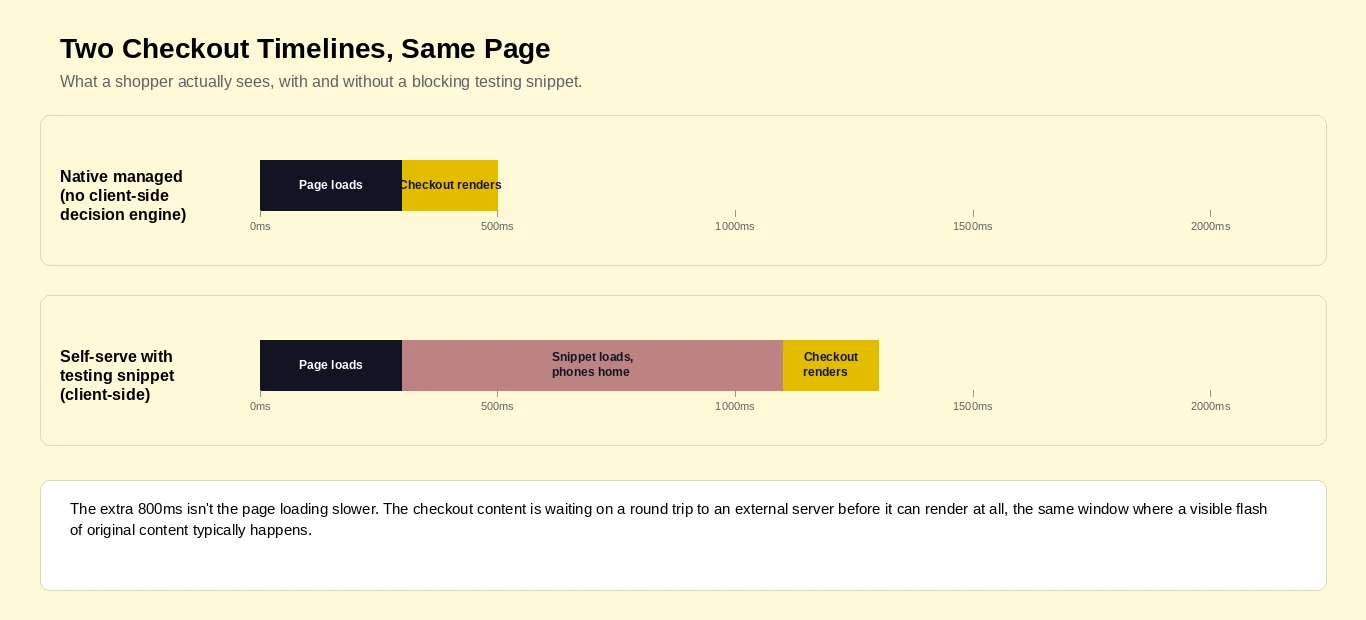
Client-side testing tools work by loading a script, waiting for it to reach out to an external server, and letting that server decide which version of the page to show. Until that round trip finishes, the browser has two options.
It can show the original page and then swap content once the decision arrives, which causes a visible flash of original content, or it can hide the page until the decision is made, which delays everything behind it.
Neither option is free. The delay shows up as render-blocking time on the main thread, and Google's own performance tooling flags any third-party script that blocks the main thread for 250 milliseconds or longer.
This isn't a fringe concern specific to any one vendor. Industry-wide guidance on reducing third-party impact treats analytics tags, ad pixels, and A/B testing tools as the same category of problem, because they all follow the same pattern: load, wait, decide, then render.
Testing tools carry a specific version of this problem that pixels and analytics scripts don't.
A tracking pixel can fire silently in the background without touching what the shopper sees. A testing tool, by definition, has to change what's on the page, which means it has to either delay the render or accept a visible flicker while it does so. There's no third option.
We built a diagnostic for exactly this problem, the same way our AI Pick Score™ and AI Listing Score™ diagnostics measure AI visibility.
This one measures something more concrete: how much drag a site's current testing setup actually adds to checkout.
It's our own internal diagnostic, not a claim that measuring third-party script impact is new. Tools like Lighthouse and WebPageTest already measure the technical side well.
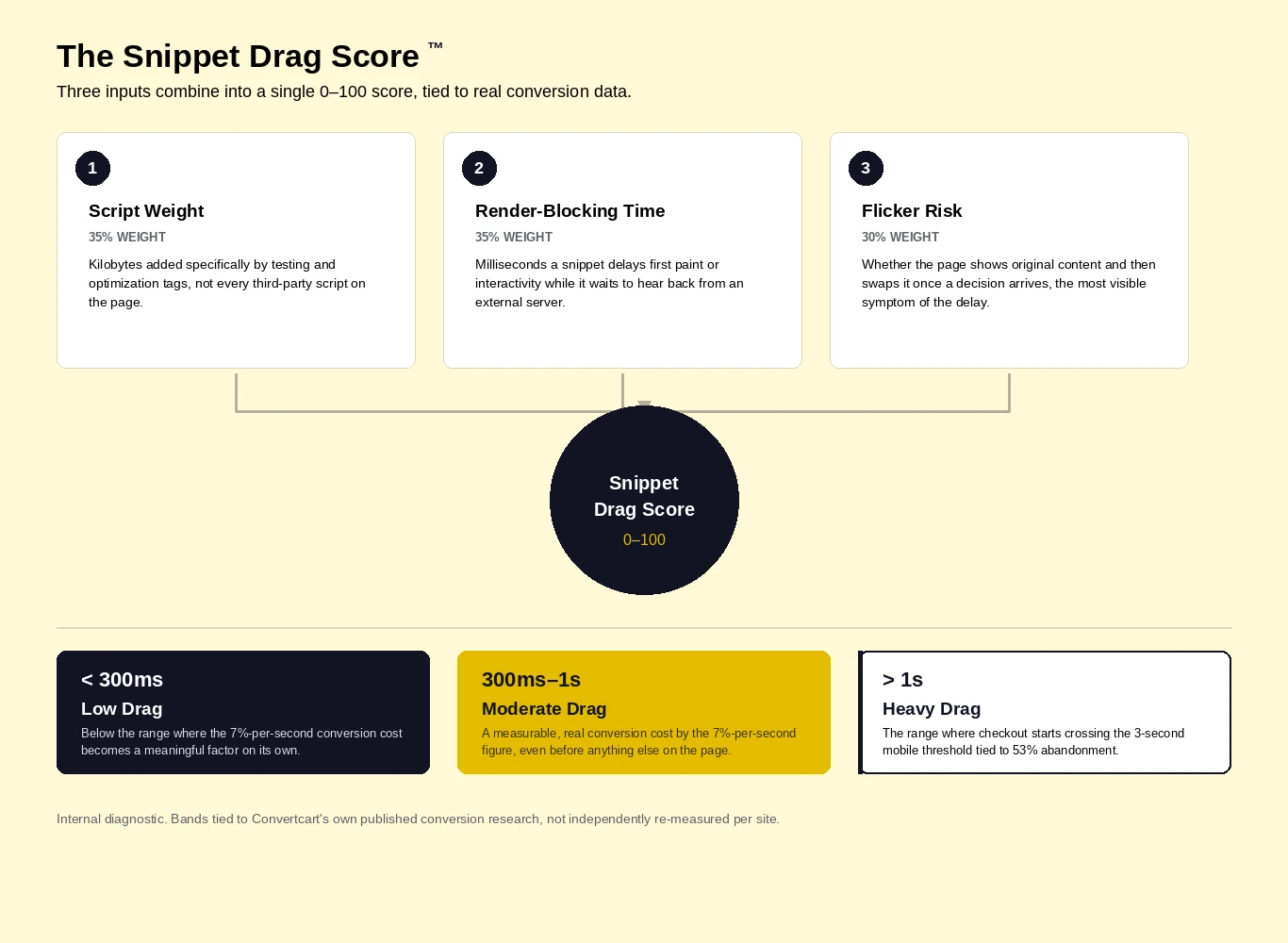
What this adds is a direct translation into the conversion-impact numbers our own research has already published. It runs from 0 to 100, built from three weighted inputs.
Script Weight (35%) measures the kilobytes added specifically by testing and optimization tags, not every third-party script on the page.
A loyalty widget and a testing tool both add weight, but only one of them has to make a rendering decision before checkout can proceed.
Render-Blocking Time (35%) measures the milliseconds a snippet delays first paint or interactivity while it waits to hear back from an external server about which variant to show.
Flicker Risk (30%) measures whether the current implementation renders final content immediately or briefly displays something else first while a decision comes back, the most user-visible symptom of the same underlying delay, and the one most likely to read as a broken page rather than a slow one.
Instead of arbitrary band names, the bands tie directly to the two real numbers this research is built on.
Low Drag, under 300 milliseconds added: Below the range where the 7%-per-second conversion cost becomes a meaningful factor on its own.
Moderate Drag, 300 milliseconds to 1 second: A measurable, real conversion cost by that same 7%-per-second figure, even before accounting for anything else on the page.
Heavy Drag, over 1 second: The range where a checkout page starts crossing the 3-second mobile threshold tied to 53% abandonment, especially once added to everything else already loading on the page.
Here's what that actually means in practice, worked through on a clearly illustrative example rather than a specific measured case.
A testing snippet adds 800 milliseconds of render-blocking delay to a checkout page, most of a full second, squarely in Moderate Drag.
Applied to the 7%-per-second conversion cost our own research has published, that single snippet is plausibly costing somewhere in the range of 5 to 6% of checkout conversions on its own, before counting anything else slowing the page down.
Stack two or three scripts making similar decisions, a testing tool, a personalization engine, a loyalty widget checking eligibility, and a checkout page can cross the 3-second mobile threshold without anyone noticing it happen gradually.
This is the mechanism behind the 53% abandonment figure. It's rarely one dramatic slowdown. It's several small ones stacking until a threshold gets crossed.
Worth being precise about what this math is and isn't. The two underlying stats, the 7%-per-second figure and the 53%-past-3-seconds figure, are real and already published in our own research.
The 800-millisecond example combining them into a specific percentage is an illustration built on those real inputs, not an independently measured result for any particular snippet or store.
The usual fix people reach for is optimizing the existing setup: deferring the script, lazy-loading it, trimming its weight.
All of that helps, and none of it removes the underlying architecture that causes the problem in the first place.
A client-side testing tool has to make a decision in the visitor's browser before it can render anything, no matter how well that script is optimized.
Convertcart's own model works differently by design, not by degree. Testing is conducted on Convertcart's behalf as a managed service, rather than shipped to the client as software the client's own site has to run and wait on.
There's no perpetually-running decision engine sitting in the checkout page's critical rendering path, because the variant decision isn't happening client-side at all. The difference is structural, not a faster version of the same optimization.
This is worth stating plainly rather than implying: the comparison here isn't "our snippet is faster than their snippet." A managed model and a self-serve client-side model are different architectures with different cost profiles, and the render-blocking, flicker-risk problem described above is specific to the second one.
Three real Convertcart client results, all from our published case study library, show what a checkout experience looks like once it isn't carrying a client-side testing burden.
Extreme Tactical Dynamics, a U.S.-based LED emergency lighting supplier, was losing mobile orders at two specific points, unclear checkout CTAs and weak payment trust signals. Fixing both produced a 5.10% increase in mobile conversions and an 11% reduction in overall checkout abandonment.
Fastenere, an industrial fastener supplier with over a million SKUs, saw a 57.1% overall conversion rate improvement after a series of checkout and product page changes, including mobile trust badges and embedded FAQs directly in the checkout flow.
Lighting & Supplies saw a 54% total website gain after addressing checkout-stage friction around shipping timelines, trust signals, and support visibility.
It's important to be exact about what these case studies prove and what they don't. None of them isolate "we removed a specific third-party testing snippet and recovered a specific percentage."
They demonstrate that a managed model, built for continuous testing without a client-side decision engine slowing down the page it's testing, compounds real results across checkout. That's a related claim, not the same one, and it's the honest one to make here.
Not every store is ready to move to a managed model, and the mechanism described above is worth acting on regardless of which model a store uses.
Audit every third-party script running on checkout specifically, not just site-wide, on a quarterly cadence.
A script that's harmless on the homepage can be the single biggest source of drag on the one page where speed matters most.
Defer anything that isn't essential to completing the transaction until after purchase. A loyalty widget or a retargeting pixel rarely needs to fire before a payment is confirmed.
Measure Interaction to Next Paint through PageSpeed Insights, and treat anything above 200 milliseconds of interaction delay as a signal to defer that script's execution.
Assign explicit dimensions to checkout images and other elements so the page doesn't shift as resources load in, a related but separate performance cost that compounds with script-driven delay.
Report page speed metrics alongside conversion rate, not alongside page weight alone. A lighter page that still blocks rendering for 400 milliseconds hasn't actually solved the problem that matters.
The question was never really whether to test. It's whether the infrastructure running those tests has become part of the friction it's supposed to be measuring.
A script that costs 800 milliseconds on checkout isn't a rounding error. Against real, published numbers, that's a measurable, ongoing conversion cost, one most stores are paying without ever having measured it directly.
If you haven't read our research on mobile checkout optimization, that's the fuller picture this post's speed argument sits inside.
And if you're weighing whether a managed model is worth the switch, CRO360 is built specifically around the architecture described here, testing conducted for you, not testing software your checkout page has to carry.
Want to know how much drag your own checkout is carrying right now? We'll measure it and show you exactly what it's costing.
Checkout typically runs more dynamic functionality than any other page, payment processing, fraud checks, shipping calculations, and often a testing or personalization script on top of all of it.
Each one adds requests and JavaScript execution the rest of the site doesn't carry.
It's what happens when a page renders its original version first and then swaps in a test variant once the testing script finishes deciding what to show.
Shoppers see the page change in front of them, which reads as a glitch even when the underlying test is working exactly as designed.
Any tool that has to make a client-side rendering decision before showing final content carries some version of this risk.
The severity depends on script weight, how the decision is made, and whether the implementation is built to hide the delay or simply accept it.
Based on our own research, a one-second delay in mobile load time correlates with roughly a 7% reduction in conversion rate.
On checkout specifically, that cost compounds with the 53% abandonment rate already documented for pages crossing the 3-second mobile threshold.
Self-serve tools run a decision engine in the visitor's browser on every page load.
Managed testing conducts that decision-making outside the checkout page's rendering path entirely, which removes the render-blocking and flicker risk structurally rather than optimizing around it.
Subscribe for more articles like this!

.svg)


.svg)

.svg)
.svg)
2026 Convertcart, All Rights Reserved
33/1, Castle Street, Ashok Nagar, Bengaluru, India