Across the BigCommerce stores we've audited, these are the three checkout mistakes we kept seeing:
37% had hidden shipping costs that showed only at the final step of checkout
23% has a visible coupon field that sent shoppers off the site to find a code
21% had mandatory account creation
And as far as recovery goes: across our customer engagement, the biggest gains came before the abandonment happened - removing checkout friction, capturing shoppers earlier, and fixing hidden leaks that recovery emails can never solve.
That's why we organize cart recovery into four separate moments instead of treating it as one problem.
Convertcart’s Cart Recovery System For BigCommerce Stores
Step
Steps you can take
Step 1: Seal the Leaks
Fix checkout friction, hidden costs, and trust gaps before the shopper abandons
Step 2: Capture Before They're Gone
Use on-site recovery while the shopper is still on the page
Step 3: Re-engage Across Channels
Send timed email, SMS, push notifications, and retargeting after the shopper has left
Step 4: Convert the Hesitant
Remove the final barrier for shoppers who have seen your reminders and still have not bought
Work through the steps in order. Most stores jump straight to Step 3. That is why most recovery emails underperform.
Step 1: Seal the Leaks — Fix BigCommerce Checkout Before Abandonment Happens
In our experience, checkout friction and surprise costs drive more abandonment than any other cause. Fix these first. No recovery tool compensates for a broken checkout.
Eliminate Hidden Costs That Cause BigCommerce Cart Abandonment
No customer appreciates shipping costs that appear suddenly at checkout. Here’s what we recommend:
Add a line below your Add to Cart button. Something like: Shipping fees are calculated at checkout. One sentence. Sets the expectation.
Then go to Settings, Tax, and Tax Rates and Zones. Set BigCommerce to display prices inclusive of tax based on the shopper's location using IP geo-referencing.
The price they see on the product page matches the price in their cart. No jump. No surprise. Make sure the total updates automatically when they add or remove items or change their shipping method.
Reduce BigCommerce Checkout Friction
You must remember that every form field is a question that adds to friction on your checkout. What should you do?
Set the billing address to match the shipping address by default. That removes six form fields instantly. If you are on a one-page checkout in the US, UK, Canada, Australia, or New Zealand, enable Google Maps autofill.
You need a Places API key, but once it is live, BigCommerce suggests addresses as the shopper types. Fewer keystrokes. Fewer errors. Fewer drop-offs.
And hide the coupon field if you are not running a promotion. A visible coupon field sends shoppers off your site to find a code. Most do not come back.
Show Real-Time Delivery Dates on Your BigCommerce Store
Vague delivery dates can make your shoppers hesitant. Here’s what we recommend in our audits of BigCommerce stores:
On product and cart pages, display an estimated delivery date using a custom field via Add Products in the BigCommerce V3 API, or a simple banner. Something like: Usually ships in 24 hours.
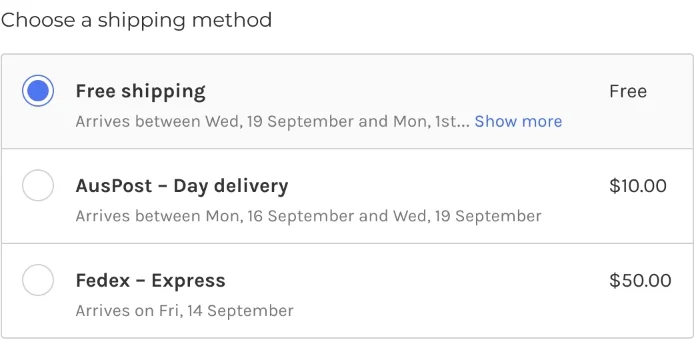
On the checkout page, integrate directly with USPS or FedEx, or use ShipperHQ. This pulls real carrier windows and shows them next to each shipping option.
The shopper picks a method, sees exactly when it arrives, and decides with full information.
Use BigCommerce Stencil Email Variables for Accurate Abandoned Cart Previews
If you have recently upgraded your storefront theme and your cart recovery emails are showing missing product images or broken links, this is likely why.
BigCommerce uses Stencil theme variables to pull cart data into abandoned cart emails. After a theme upgrade, old templates may reference outdated variable names.
Check your templates and update them to the current Stencil variables for cart contents, the checkout link, and any coupon codes.
Capture Shopper Emails Early with the BigCommerce Checkout SDK
Most cart recovery systems have a blind spot. They only work for shoppers who have already given their email address. Here’s what we suggest you do for all others:
Use the BigCommerce Checkout SDK. It lets developers inject logic into the checkout flow, including capturing the shopper's email at step one, before they complete the rest of the form. Once you have that email, your recovery sequence can fire even for mid-checkout abandoners.
Some email platforms handle this automatically when integrated with BigCommerce. Others need a small amount of custom development. Either way, mid-checkout abandonment is a significant and largely invisible leak. It is worth fixing.
⚠️
Find out what's stopping your visitors from buying
Step 1 reduces the number of shoppers who leave. Step 2 catches those who still do while they are still on the page. A well-designed cart page makes this much easier, since shoppers need to see their items clearly before any recovery tool has a chance to work.
Enable BigCommerce Persistent Cart for Cross-Device Recovery
Persistent Cart saves a logged-in customer's cart for 30 days across any device or browser. For anonymous visitors, BigCommerce keeps the cart in the browser cache for 7 days by default.
This matters because shoppers routinely browse on one device and buy on another. Without Persistent Cart, that cart is gone when they switch.
Plan requirement
Persistent Cart requires a Plus, Pro, or Enterprise plan. Enable it under Store Setup, then Checkout, then Cart and Checkout, then Persistent Cart.
Install Exit-Intent Tools via BigCommerce Scripts Manager
How to create popups that help you with BigCommerce cart recovery?
You do not need to touch your theme code to install them. BigCommerce Scripts Manager handles this. Go to Store Setup, then Script Manager, then Create a Script.
Paste in the snippet from your provider, set the placement to Footer and the location to All Pages, and save. That is it.
For pop-ups that only appear on the checkout page, set the location to Checkout instead. This keeps exit-intent tools out of pages where they would distract shoppers who are already in the buying flow.
Understand BigCommerce Plan Requirements Before Investing in Recovery Tools
This one saves you time and money. In our experience, several of the most effective cart recovery features in BigCommerce are gated behind specific plan tiers. If you set up a workflow that depends on a feature your plan does not include, it will not work.
The Abandoned Cart Saver and Persistent Cart both require Plus or above. Audience segmentation and targeting require Enterprise. Multiple concurrent promotions are limited on lower plans. Check your plan before you build. It tells you which strategies are available to you right now and which ones require an upgrade or a third-party tool to replicate.
Set Up BigCommerce Abandoned Cart Recovery for Headless Storefronts
If your BigCommerce store uses a headless frontend, such as Next.js or Gatsby via the Storefront API, the native Abandoned Cart Saver may not fire reliably.
It depends on Stencil theme events that a headless frontend does not generate. The fix is to use the BigCommerce Cart API webhooks instead.
Configure the store/cart/abandoned webhook to notify your email platform when a cart has been inactive for a set period.
Then use the Storefront API to retrieve cart line items and pass them into your email tool for personalised content.
Klaviyo and Omnisend both integrate with BigCommerce in a way that works independently of the theme, which makes them the practical choice for most headless setups.
Step 3: Re-engage Across Channels — BigCommerce Email, SMS, and Retargeting
The shopper has left. Step 3 brings them back. The keyword here is sequenced. Each message has a specific job, and the channel mix is layered in order of open rate and immediacy.
The Convertcart recommended sequence for BigCommerce stores
Timing
Channel
Job
What To Include
1 hour after
Email 1
Gentle reminder
Cart contents, product image, direct checkout link. No discount yet.
1 day after
Email 2 and SMS
Reassure
Return policy, social proof, product USP.
2 to 3 days after
Email 3 and push
Incentivise
Time-limited discount or free shipping. Urgency.
7 days after
Retargeting ad
Re-surface
Dynamic product ad on Google or Meta showing the abandoned item.
Set Up BigCommerce Abandoned Cart Saver Emails
The Abandoned Cart Saver is BigCommerce's built-in recovery tool. Once enabled, it automatically sends up to three emails to customers who leave items behind.
Enable it under Marketing, then Abandoned Cart Notifications. You need a Plus plan or above. Set up three templates.
The first goes out one hour after abandonment, a gentle nudge with the cart contents and a direct link back.
The second goes out a day later with more product detail or social proof. The third goes out two to three days later with a time-limited incentive. Most stores configure one template and leave it there. Three templates, used well, recover significantly more carts.
Know the Limitations of BigCommerce's Native Abandoned Cart Saver
The native tool is a good starting point. It is not a complete solution. The email design options are limited, which makes it hard to match your brand properly.
You cannot build complex automation workflows. You cannot segment your audience. You cannot A/B test. And you cannot personalise beyond the basic Stencil variables. For stores with a high average order value or a diverse customer base, those limitations matter.
A dedicated email platform integrated directly with BigCommerce, gives you segmentation, dynamic product blocks, A/B testing, and full design control. The integration takes a few minutes to set up, and the results are measurably better.
Use the BigCommerce Discount Rule Engine to Automatically Reward Cart Recovery
BigCommerce has a built-in discount rule engine that lets you set up promotions that apply at the cart automatically, with no coupon code required.
This removes the friction of code entry and eliminates the incentive for shoppers to go looking for a better deal elsewhere.
You can create whole-cart discounts based on order value, category discounts, free shipping thresholds, quantity pricing tiers, and BOGO deals. The discount appears in the cart summary automatically when the conditions are met.
One important note. Running multiple promotions at the same time is not available by default on basic BigCommerce plans. If you want to stack promotions, check your plan first.
Integrate ShipperHQ with BigCommerce for Real-Time Carrier Rates at Checkout
Shipping uncertainty is a quiet abandonment driver. Shoppers who are not sure whether their order will arrive in time, or who cannot find a shipping option that fits their budget, leave.
ShipperHQ integrates directly with BigCommerce and pulls real carrier rates and delivery windows from USPS, FedEx, UPS, and others. It displays those options clearly at checkout, with actual arrival dates next to each one. Shoppers stop guessing. You stop losing sales to shipping ambiguity.
Use BigCommerce Customer Groups to Segment Abandoned Cart Recovery Offers
Not every abandoner is the same. A first-time visitor and a customer who has bought from you six times should not receive the same recovery email. BigCommerce Customer Groups lets you segment customers and target them with different recovery offers.
You might offer a VIP shopper early access to a new product. You might remind a lapsed customer of their loyalty credit.
You might give a first-time buyer a small discount to push them over the line.Customer Groups are available on all plans. Audience targeting and segmentation in the promotion engine require Enterprise.
For the full picture of what's configurable in your BigCommerce admin — checkout, trust signals, personalization — see our complete BigCommerce conversion audit.
Recover BigCommerce Abandoned Carts with Google and Meta Retargeting
Retargeting helps you reach those who have shown interest in your store. Connect your BigCommerce store to Google and Meta through the app marketplace.
Both integrations sync your product catalog automatically and let you set up dynamic product ads that show the specific items a shopper left behind.
The shopper sees your product again while browsing other sites or scrolling their feed, and clicks back to complete the purchase. Retargeting ads work best as the final channel in your recovery sequence, roughly seven days after abandonment, when email and SMS have already had their chance.
Strong psychological triggers like scarcity and social proof work especially well in retargeting creative, since the shopper has already seen the product once.
Step 4: Convert the Hesitant — Remove the Final Barrier to Purchase
These shoppers have seen your emails. They have seen your ads. They still have not bought. That tells you something. They want the product. Something is stopping them. Step 4 is about finding out what that is and removing it.
The three most common objections at this stage
Objection
Signal
Fix
Price feels too high
High value cart, no code used
Offer BNPL. Show the instalment amount on the product page, not just at checkout.
Not sure it is right for me
Multiple return visits, no conversion
Add social proof to the product page. Video testimonials, review counts, return rates.
Worried about returns
High-return product category
Show an extended return window badge at checkout. Offer store credit as an alternative to a full refund.
Use BigCommerce Gift Certificates and Store Credit to Recover Repeat Customer Carts
Offering something personal is an excellent cart recovery strategy for repeat customers. BigCommerce lets you issue gift certificates under Marketing, then Gift Certificates.
Include one in a targeted recovery email to a loyal customer, and it feels like a reward, not a clearance sale. Store credit works similarly.
Add a banner for logged-in customers showing their available credit. That credit is a pull towards completing the purchase. It is already theirs. They just need to spend it.
Add BigCommerce Custom Checkout Policy Badges to Reduce Purchase Anxiety
Sometimes the barrier is not price. It is uncertainty. Will this product be what I expect? What happens if I need to return it?
Add custom policy badges to your checkout page. Looking at well-written return policy examples from other stores is a fast way to see what language actually reduces hesitation.
An extended return window, shown clearly at the moment of purchase, removes the risk. Offer partial refunds or store credit for returned items to give hesitant buyers a fallback they can live with.
Enable BigCommerce Guest Checkout to Remove the Account Creation Barrier
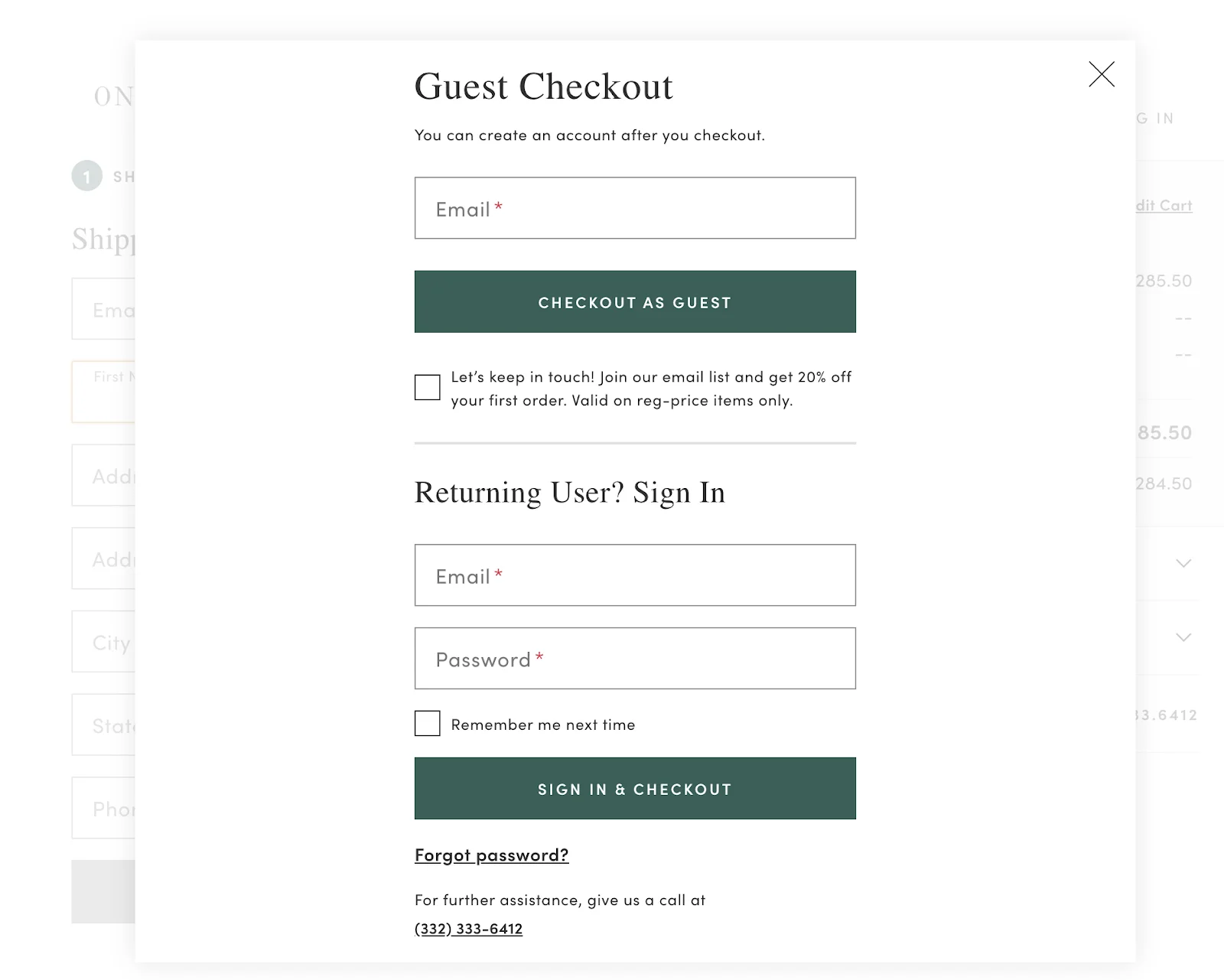
Mandatory account creation is painful for any customer. Go to Store Setup, then Checkout, and set Account Creation to Optional. That is it.
BigCommerce requirement
Enhanced guest checkout features require Optimised One-Page Checkout. If you are on Legacy Checkout, you will need to migrate first.
Even with guest checkout enabled, collect the shopper's email during the flow. You still get the contact details you need for follow-up. The shopper does not have to create a password to get there.
Use the BigCommerce Wishlist to Recover Purchase Intent from Browsers
You don’t need to lose customers who’re not ready to buy today. Don’t forget to display the Add to Wishlist button prominently on all product pages.
Shoppers need to be logged in to save items, which gives you a natural, low-friction prompt to create an account after guest checkout.
Enable the Share button on wishlists too. A shared wishlist is a word-of-mouth recommendation that brings new visitors to your store. Set up automated email reminders for wishlist items that have not been purchased within 14 to 30 days.
A countdown timer on a low-stock wishlist item adds a layer of urgency that a plain reminder email does not.
Set Up BNPL via BigCommerce Payments to Remove the Price Objection
Some shoppers just aren’t comfortable paying the full price. For those customers, you need to set up BNPL.
BigCommerce Payments supports native BNPL options including Klarna and PayPal Pay Later. Display the instalment amount on the product page, not just at checkout.
Three payments of eighteen dollars is a very different psychological experience from fifty-four dollars today. If BigCommerce Payments is not available in your region, check the app marketplace for third-party BNPL providers.
Choose one based on your average order value and your customer's location. Different providers operate in different markets, and their credit limits vary.
Add Post-Purchase Upsell Funnels to Recover Revenue After BigCommerce Checkout
Most cart recovery thinking stops at the checkout. Post-purchase funnels extend it. A post-purchase funnel shows a targeted offer after the shopper completes their order but before they reach the thank-you page. The shopper is already in buying mode.
They have just confirmed their payment details. A relevant upsell at this moment converts at a much higher rate than the same offer shown before checkout.
BigCommerce does not have this built in, but apps like Bold Upsell and CartHook add it via the app marketplace. Set up offers that relate directly to what the shopper just bought, and keep the price point lower than their original order.
⚠️
Find out what's stopping your visitors from buying
Product discovery – barriers that prevent shoppers from finding items
Category/collection pages – improvements that drive deeper product exploration
Product page – what to optimize to convert 2–3x more buyers
Cart – ways to ease hesitation and speed up purchase decisions
“The report was deep and super insightful. Can’t believe it’s free.”
Logan Christopher CEO, Empire Herbs
Common BigCommerce Cart Abandonment Mistakes and How to Fix Them
Even stores with the right tools in place leave revenue on the table. Here is what we see most often.
Mistake
Why It Happens
Fix
Sending only one recovery email
BigCommerce defaults to one template and most merchants never add more
Configure all three email slots under Marketing then Abandoned Cart Notifications
Leading with a discount in email 1
Feels generous but trains shoppers to abandon on purpose and wait for the deal
Save the incentive for email 3 only. Use the first two emails to remind and reassure.
Leaving the coupon field visible when no promo is running
BigCommerce shows it by default
Hide it in checkout settings. A visible empty coupon field sends shoppers off your site.
Not customising beyond default Stencil variables
The native editor is limited and easy to leave at defaults
Integrate Klaviyo or Omnisend for dynamic product blocks and full design control.
Using the native Saver for high-AOV stores without segmentation
The built-in tool has no segmentation capability
Move to a dedicated ESP integrated with BigCommerce for segment-based flows.
Advanced BigCommerce Cart Recovery: Going Further
BigCommerce Plan Requirements for Cart Recovery: What Each Plan Unlocks
Before you build a recovery workflow, check what your plan includes. Several of the most effective features are gated behind higher tiers.
Feature
Standard
Plus
Pro
Enterprise
Abandoned Cart Saver
No
Yes
Yes
Yes
Persistent Cart
No
Yes
Yes
Yes
Customer Groups
Yes
Yes
Yes
Yes
Audience Segmentation and Targeting
No
No
No
Yes
Multiple Concurrent Promotions
No
No
Limited
Yes
Scripts Manager
Yes
Yes
Yes
Yes
Cart Abandonment Rate Benchmarks for BigCommerce Stores by Vertical
The widely cited 70% average does not mean much on its own.
What matters is how your store compares within your category, and why your own rate might be running high in the first place. A 78% abandonment rate in fashion is normal. The same rate in grocery is a problem.
Vertical
Abandonment Rate
Primary Driver
Where To Focus
Luxury and jewellery
82%
High ticket size, long consideration window, gifting uncertainty
Rich media, early duty and tax display, digital wallets
Beauty and personal care
81%
Shade and fit risk, heavy mobile traffic
Shade-matching tools, sample bundles, mobile checkout optimisation
Home and furniture
80%
Bulky freight, long delivery ETAs, high price
Upfront shipping fees, in-stock lead times, room visualisers
Fashion and apparel
68 to 74%
Size comparison, browsing across tabs, impulse-driven but price-sensitive
A realistic recovery rate for a well-optimised BigCommerce store sits between 5% and 15% of abandoned carts, depending on your category and the number of recovery channels you are running. If you are below 5%, start with Steps 1 and 2.
If you are above 10%, focus your energy on segmentation and personalisation in Step 3.
How to A/B Test Your BigCommerce Abandoned Cart Emails
Most BigCommerce stores set up their recovery email sequence once and never revisit it. A/B testing is how you find out what actually works for your specific audience.
What To Test And How To Do It
Subject lines: test urgency against curiosity. Try Your cart is about to expire versus You left something behind. Run each for at least 30 days.
Send timing: first email one hour after abandonment versus three hours. Your audience behaviour determines which wins.
The offer: a discount in email 1 versus holding it until email 3. Test the impact on both recovered revenue and how often shoppers deliberately abandon to wait for a deal.
CTA copy:Return to cart versus Complete your order versus Get it before it's gone. Small copy changes move the needle more than most expect.
How to set it up: go to Marketing, then Abandoned Cart Notifications, and configure a second email template as your variant. Track recovered revenue per email sent, not just open rate. Open rate tells you who read the email. Recovered revenue tells you who bought.
Which BigCommerce Plan Includes Aandoned Cart Emails?
The Abandoned Cart Saver is available on Plus, Pro, and Enterprise plans. It is not included on the Standard plan.
If you are on Standard and want automated cart recovery emails, you can either upgrade or connect a third-party email platform like Klaviyo or Omnisend, both of which integrate directly with BigCommerce
Does BigCommerce Send Abandoned Cart Emails Automatically?
Yes, once you enable the Abandoned Cart Saver and configure at least one email template under Marketing then Abandoned Cart Notifications, BigCommerce triggers emails automatically when a customer abandons their cart. You can set up to three emails with different send times and content.
What Are the Limitations of the BigCommerce Abandoned Cart Saver?
The native tool is limited to three email templates and has restricted design options, making it hard to fully match your brand. It does not support audience segmentation, complex automation workflows, or A/B testing.
For stores with a high average order value or a diverse customer base, connecting a dedicated email platform gives significantly better results.
What is the Best Time to Send a BigCommerce Abandoned Cart Email?
Send the first email one hour after abandonment as a gentle reminder. Send the second 24 hours later with more detail or social proof. Send the third two to three days later with a time-limited incentive. These are starting benchmarks.
Test them against your own audience and adjust based on what recovers the most revenue.
Can BigCommerce Track Abandoned Carts Without an Email Address?
No. The native Abandoned Cart Saver requires a customer email address to send recovery emails. Anonymous visitors who leave without providing an email cannot be reached by email.
For those shoppers, on-site recovery tools like Persistent Cart and exit-intent pop-ups, and paid retargeting ads on Google and Meta, are your best options.
How do I Set up Abandoned Cart Emails in BigCommerce Step by Step?
Log in to your BigCommerce admin. Go to Marketing and then Abandoned Cart Notifications. Toggle the switch to enable the feature.
Click Add Template to configure your first email. Set the send time, write the subject line and email body, and make sure your template references the correct Stencil variables for cart contents and the checkout link.
Repeat for up to two more templates at different send times. Save your settings and test by abandoning a cart on a test account.
Subscribe for more articles like this!
Thank you - we'll see you in your inbox soon!
Oops! Something went wrong while submitting the form.
Read by 5000+ ecommerce store owners
Subscribe for more articles like this!
Thank you - we'll see you in your inbox soon!
Oops! Something went wrong while submitting the form.





.avif)
.svg)


.svg)

.svg)
.svg)
