Ecommerce Growth
How to use AI this BFCM to get more eCommerce sales
September 12, 2025



As the countdown to Black Friday and Cyber Monday (BFCM) 2026 begins, you just can’t afford to lose people who are ready to splurge $$$. And it all begins with using AI in your BFCM campaigns.
But how exactly do you as an eCommerce business use AI for Black Friday?
That’s what we’re here to answer, here are 23 AI BFCM strategies that you can use:
1. Create content designed for shoppers as well as AI
2. Create omnichannel Black Friday marketing campaigns with AI
3. Forecast demand with AI for BFCM
4. Test filter UX and arrangement with AI
5. Auto-generate product descriptions at scale
6. Discount the right products
7. Personalize product recommendations during BFCM
8. Inspire shoppers with AI-powered visual search
9. Run an AI-powered FAQ section on product pages
10. Automate upsells and crossells this BFCM
11. Offer personalized shopping assistance
12. Offer more surprise deals after purchase
13. Clean your deliverability way before the BFCM weekend
14. Nudge abandoners with contextual buying paths
15. Predictively downsell to recent purchasers
16. Target high value shoppers with optimized pricing and perks
17. Push first-party signals to ads
18. Generate a "AI-Friendly" Black Friday Sale page
19. Use sentiment-driven review sorting to display summaries
20. Send perfectly timed SMS flash sale alerts
21. Automatically trigger a "Reserve Black Friday Deal" pop-up
22. Swap hero copy and offers by audience
23. Auto-generate media that AI search engines can read
But first,
⚠ These are the strategies that separate winners from everyone else this BFCM. Fair warning: they require proper setup.
Shoppers start building lists for Black Friday well before it even arrives, the sole reason behind it: “discounts.” Salesforce calls it ‘discount chicken’, but to us, it means using AI to get AI visibility. This way, you get your products in wishlists, way ahead of Black Friday.
Kickstart your BFCM planning with AI. Use Gen AIs to find and reach out to blogs that rank on terms like:
This way, you can gain traction in search results and AI citations. You can even take it a step further and repurpose these blogs as a carousel/teaser video on Instagram (search engines now index Instagram posts).
As Black Friday approaches, you should start publishing your own content like livestreams, surprise product drops, and make sure you link out to your BFCM deal pages.
With AI’s help, you can not only decide on the exact publishing schedule, but also generate what topics you need to cover, scripts, and how to engage shoppers during livestreams.
Here’s a great example from Free People’s livestream – note how they automatically tag products, while the livestream happens, along with comments:

Also read: The Most Creative Black Friday Campaigns in eCommerce
While AI cannot replace creativity, it certainly helps you figure out the mechanics of creating consistent BFCM campaigns that give shoppers the same feel every time they interact with you (no matter the platform).
Use AI to plan where and when you go live with your Black Friday sale, how do you warm up, and how exactly do you cut through the noise. For example:
Here’s a great example of an awesome eCommerce BFCM ‘AI’ campaign from Cards Against Humanity.
They not only created an 11 hour long livestream, but ensured that they embedded it within their landing page. The goal? Pit humans against AI and see who wins:

Also read: 34 Black Friday Marketing Ideas
The whole idea here: create data-driven decisions, without being swaddled in 30 Google Sheet tabs. AI can help you crunch the data and do a lot more for your BFCM planning.
Here’s how to put it to work:
Pro Tip: If inventory runs out, don’t just leave shoppers hanging. Automatically trigger a pop-up on OOS pages and offer to deliver the product by a fixed date at a set discount. It’s a simple way to capture intent before it leaks to competitors.
⚠ This AI BFCM strategy requires clean historical data going back 2+ years and proper AI model setup. Not sure if your data is ready? Most stores we audit have gaps that prevent effective forecasting.
Many shoppers ask really specific questions, for example, “what V neck cream colored tops for size L are running huge discounts?” So, what you can do with AI for BFCM is:
For example, some shoppers may like to quickly identify and find products by BFCM-friendly filters like “Fast Shipping", "Limited-Time Offers", "Highly Discounted", “Free Gift Wrap Available”, etc.
Some shoppers respond better to personalized product detail filters like, “Recommended for You”, “Top Eco-Friendly Picks”, or “Available in XL” (base these on previous purchases or browsing behavior during your BFCM campaign).
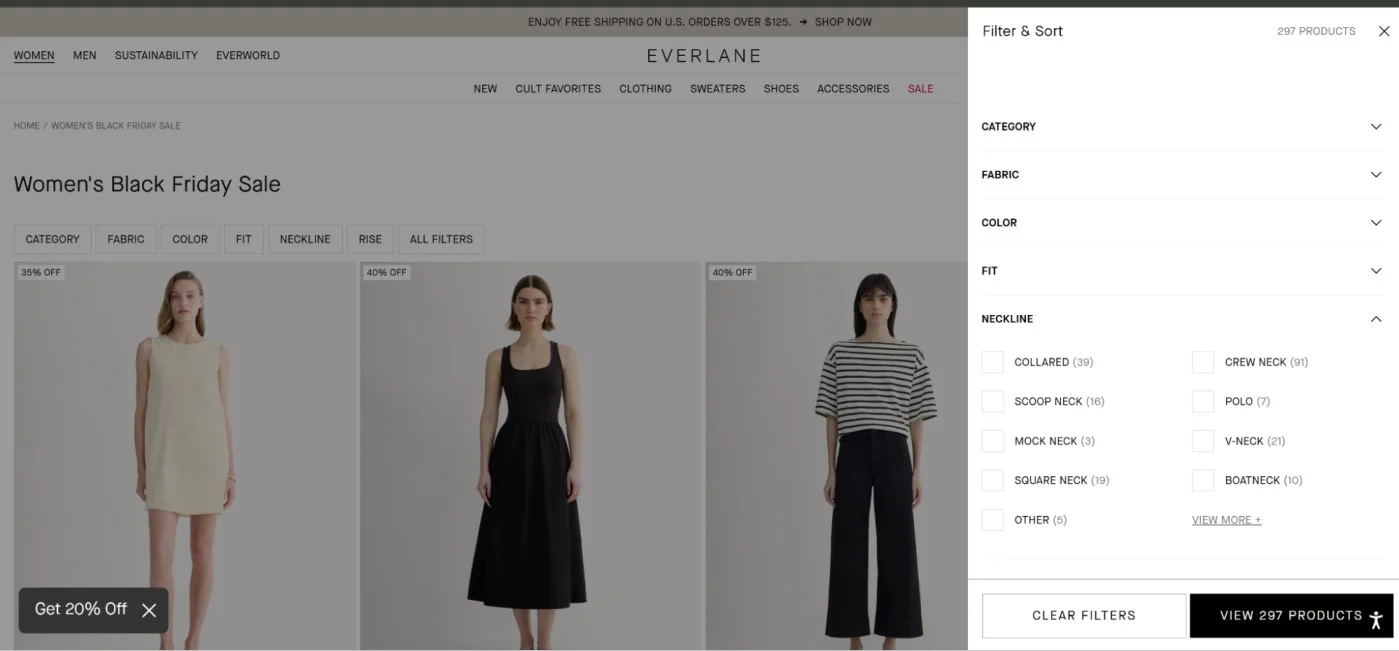
Here’s a great example of this AI BFCM strategy in action from Everlane. Note how they arrange the filters by analyzing product attributes and customer preferences to create precise, tailored filters, enhancing the BFCM shopping experience, on their Women’s Black Friday sale page:
With the right AI tools, you can create compelling and engaging descriptions that resonate with your customers.
Plus, it may help you obtain citations in search results within Gen AIs and maybe even Google’s AI results during Black Friday 🙂
How you can do this with AI for BFCM: highlight key USPs that matter during Black Friday, like ‘ideal for gifting.’ Research from BCG shows nearly 60% of all BFCM purchases are some form of gift. Instead of “Made with 100% merino wool, this cozy fleece blanket is breathable, and hypoallergenic”.
Say, “Made with 100% merino wool, this cozy fleece blanket is breathable, hypoallergenic, and perfect for gifting under $XXX for Christmas. Enjoy its luxurious softness and stylish design, ideal for any living room.”
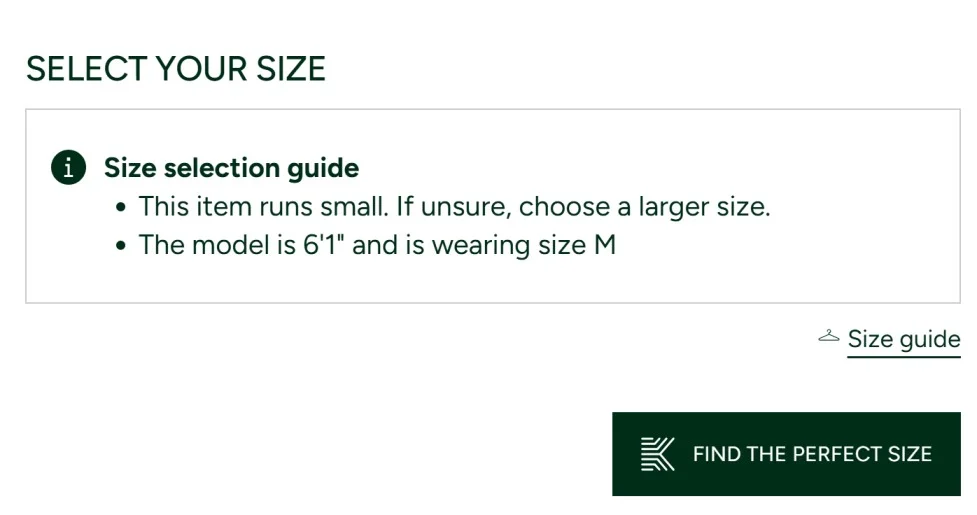
Also, use AI to check the UX of your descriptions. No AI or human is clicking through five tabs to read specs. Most shoppers won’t even see them.
AI can help you spot friction and replace clunky UX.
For example, you can push ingredient icons up top for beauty shoppers, or use quick microcopy to highlight who a product is for. Lacoste does this well with their sizing help:
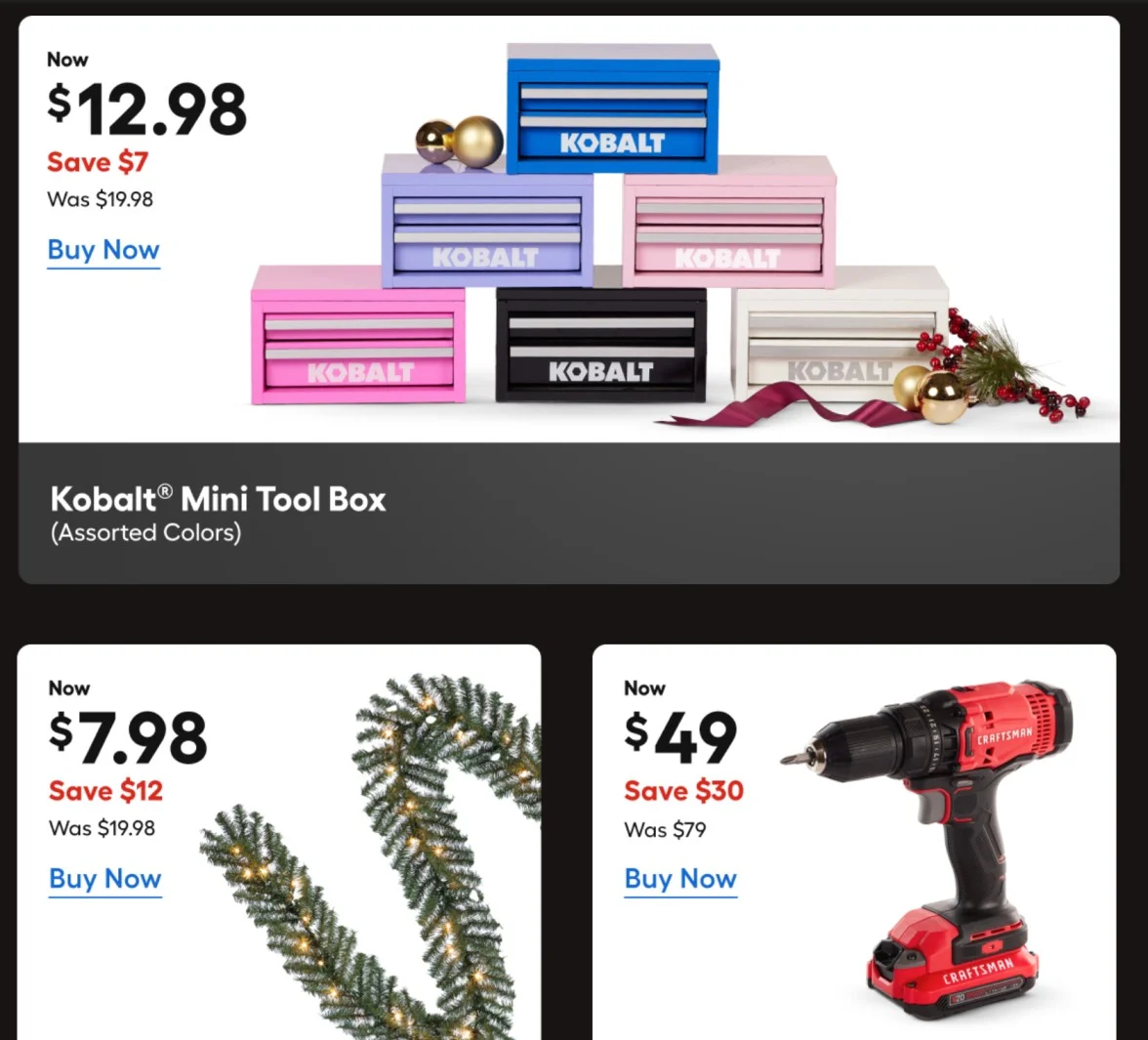
AI can help you figure out which products can sell with lower discounts and appeal to high value shoppers.
For example, if your bestseller is a $20 item with 30% off, also display a premium $45 upgrade of a $55 product on the same page. Bring out the value differences, say, bigger size, premium ingredients, etc.
Who wants to scroll through 5 pages to find what they wished for Black Friday, 3 months ago? Shorten the decision path and use AI using AI to populate products they actually like (or have interacted with).
AI can also analyze past BFCM sales data to identify which products sold the best and what was most frequently searched.
This allows you to create targeted categories like “Last Year’s Best Sellers” or “Returning BFCM Favorites.” Or for that matter, you can showcase dynamic gift guides for Black Friday.
AI can automatically create and populate categories based on what shoppers search for and view, in real time (and based on previous year site search and traffic data).
Here’s a great example from Lowe’s, where they automatically show categories on the homepage, a shopper is most likely to interact with (note the $50 and under category. Remember, they have 1000s of SKUs under $50, but on opening it, the most relevant options show up):

Here’s another from them.
Note how they feature product categories based on what a shopper has previously interacted with and what’s trending in the location a shopper’s coming in from (note how they make the price savings clear – you can also use AI to test how prices get displayed):
Imagine this: a shopper searches for a dress they really like on Google Images – and they see your product with a badge showing 60% OFF! Awesome, right?
This is exactly why your in-store experience should feature AI-powered visual search features, especially during Black Friday.
You can offer an option to upload a photo and search in your product listing pages or site search. What AI does is: it not only populates exact matches but also shows similar styles.
However, do ensure you show listings on discount first, given it’s Black Friday.
This not only enhances product discovery but also ensures shoppers don’t miss out on your best BFCM deals simply because they couldn’t articulate their needs.
Plus you reduce the likelihood of returns.
This especially works great in fashion, home decor, and furniture brands. Because many customers might not know the exact name of the product they want.
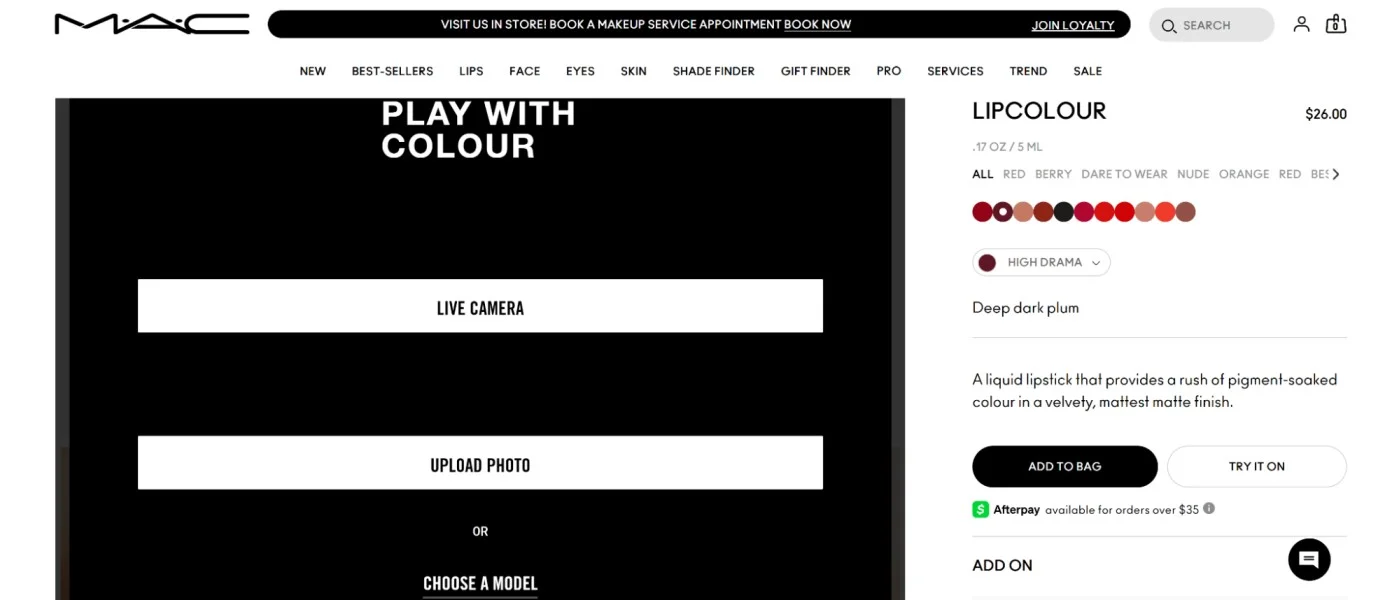
Quick Tip: Also have the option for virtual trials if your products have a high visual appeal. While many shoppers may have already built lists and are waiting for discounts, having the option to try on multiple products virtually, can be the difference between a sale made and a ‘save for later.’ Here’s a great example from MAC Cosmetics offering virtual trials using AI:
Also read: Using AI to Improve eCommerce Product Discovery: 9 Neat Ideas
During the BFCM weekend, shoppers want answers now. And your customer support team will almost certainly be overburdened.
What you can do is: auto-generate FAQs and add a chat flow to provide instant answers to burning questions about your BFCM sale, like:
This way, you only escalate truly urgent requests. Also, you can also personalize the FAQ section based on customer behavior.
For instance, if most people are asking about return policies during BFCM, AI can prioritize those questions and highlight policies relevant to the current BFCM campaign.
Plus, you can use AI to analyze reviews and previous interactions to automatically add FAQs like “Is this product good for winter?” or “Does it come in other colors for the BFCM weekend?”, which helps BFCM customers make faster decisions.
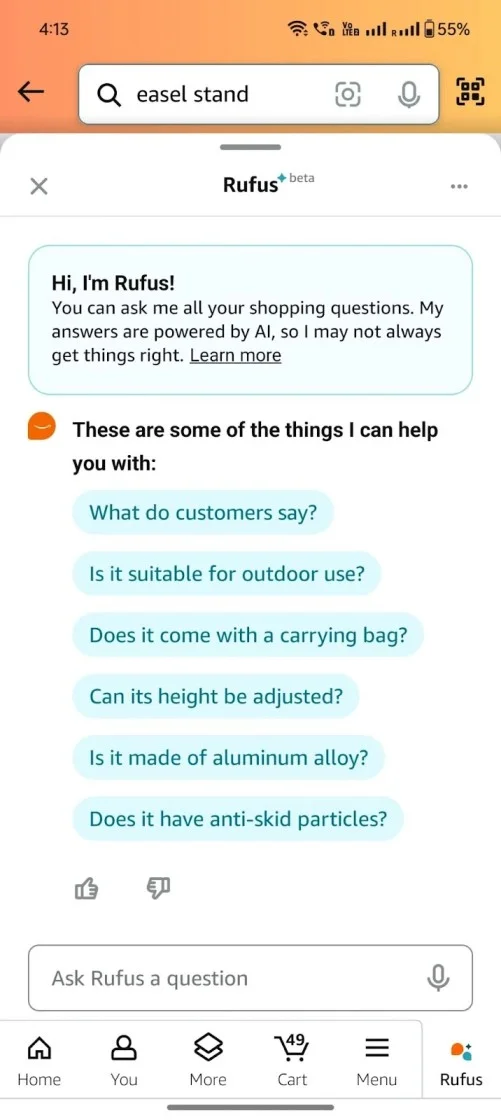
Here’s a great AI BFCM chatbot example from Amazon:
Also read: Using AI for Conversion Rate Optimization: 7 Proven Strategies for eCommerce Stores
Say, someone has a wishlist going, and they head on to your checkout page with only one product.
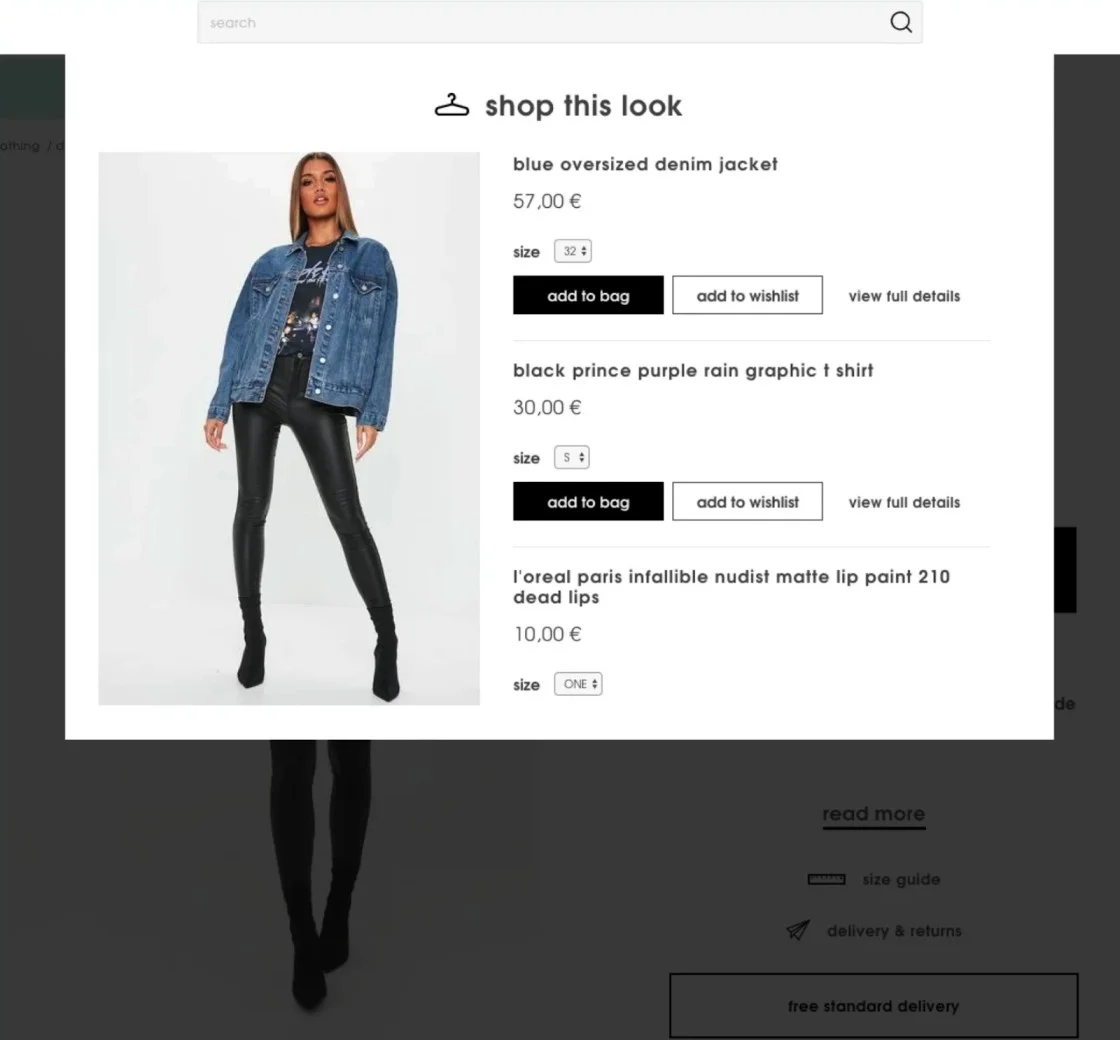
What if you could create a dynamic bundle from that list or throw in complementary products to create a bundle? That’s exactly what AI can help you with.
During Black Friday, you can use AI to push bundles at checkout with copy like “Bundle with X and save 20%” or “Shoppers who bought this also grabbed Y” (which helps boost AOV too).
Here’s a great AI in BFCM cross-sell example from Missguided:
AI can gather feedback from customers regarding their shopping experience.
It can also analyze customer data and browsing history to offer personalized support.
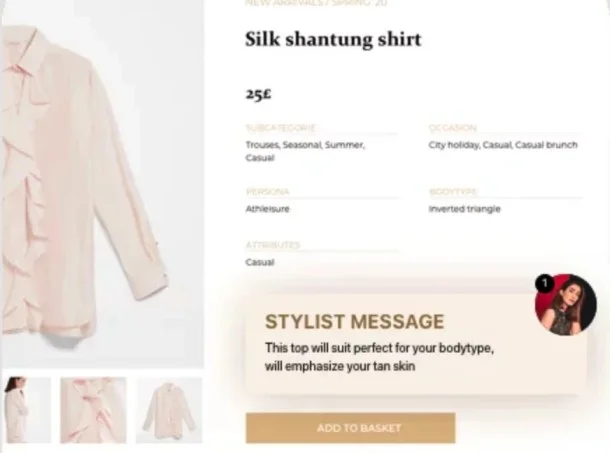
For example, if a shopper is looking for gift ideas, your AI can suggest items based on their past interactions, making their BFCM sales experience feel more customized and engaging.
Here’s a great example showing a nudge, personalized for the shopper:
Who says you should stop nudging a shopper after they complete one purchase? Say something like “Just for you: Exclusive Surprise Deal Unlocks in XX:XX:XX.”
This way you can not only offer even greater value to your BFCM campaigns, but you can use AI to make 'em a BFCM offer they can’t refuse.
The idea: AI sniffs out non-engagers within your email list and removes them well ahead of Black Friday.
As a best practice, put this AI BFCM strategy to practice before Labor Day or Back to School Season.
This way, your deliverability score improves ahead of time, giving you scope to actually get into inboxes during the Black Friday weekend.
Instead of generic "You forgot something" emails, AI can trigger contextual interventions.
For example, if a subscriber spent time reading reviews, they get educational content in their cart abandonment emails with some more social proof.
If they browse multiple categories, they get a "save for later" wishlist.
Or base the cart recovery email on product sizes/variants a shopper prefers, that have discounts.
Let’s face it: BFCM may be the biggest sales event, but chances are some shoppers may have already made their biggest purchases.
What AI can help with is: first, identify these shoppers and second, target the right incentives.
For example, you can offer larger discounts on 3 months worth of refills (or send complementary SKUs like discounted sticker packs for t-shirt stores).
You know the drill: BFCM means discounts. But it doesn't have to mean you have to dig into profit margins.
All you have to do is use AI in your BFCM campaigns to give your best buyers a private window.
Start with smaller discounts but way earlier access to limited inventory. The goal here is to get them to shop more, and not exhaust their spending potential (at least in one go).
With real time behavioral pricing, you can also use AI to adjust how prices display during BFCM, based on browsing patterns, time on page, and cart value.
For example, AI can automatically offer bundle pricing or tiered discounts to shoppers with higher AOV and “today only Black Friday prices” to infrequent shoppers.
Manually creating audience segmentation rules in your ad platform is a good way to ensure you overspend on your BFCM ad campaigns.
AI can not only send the right signals to your ad platform, so as to know who to exactly retarget with what offer.
For example, someone who has zoomed on images and read reviews can get a simple reminder ad, instead of an additional discount. Why? High purchase intent.
Also, you can use AI to tailor your follow-up communication across multiple channels after shoppers exit your store during Black Friday.
Pro Tip: You can also use this first party data to optimize ad spend during BFCM, for example, AI can map engagement and automatically send signals to your ad platform to serve your BFCM ads ahead of time (because many of your shoppers may start shopping before Black Friday, like Singles Day or Fake Friday).
Preferably one that remains active all year round. Except that you don’t have to offer deals all through the year; instead, you just use AI to update it with new information, and warm up your audience.
Start from early October, and drop in info like what discount percentages to expect, when the sale launches, etc.
Also, do ensure you optimize your store’s structured data at scale. Gen AIs and Google’s SGE look at schemas, product feeds, and XML sitemaps to scan your website.
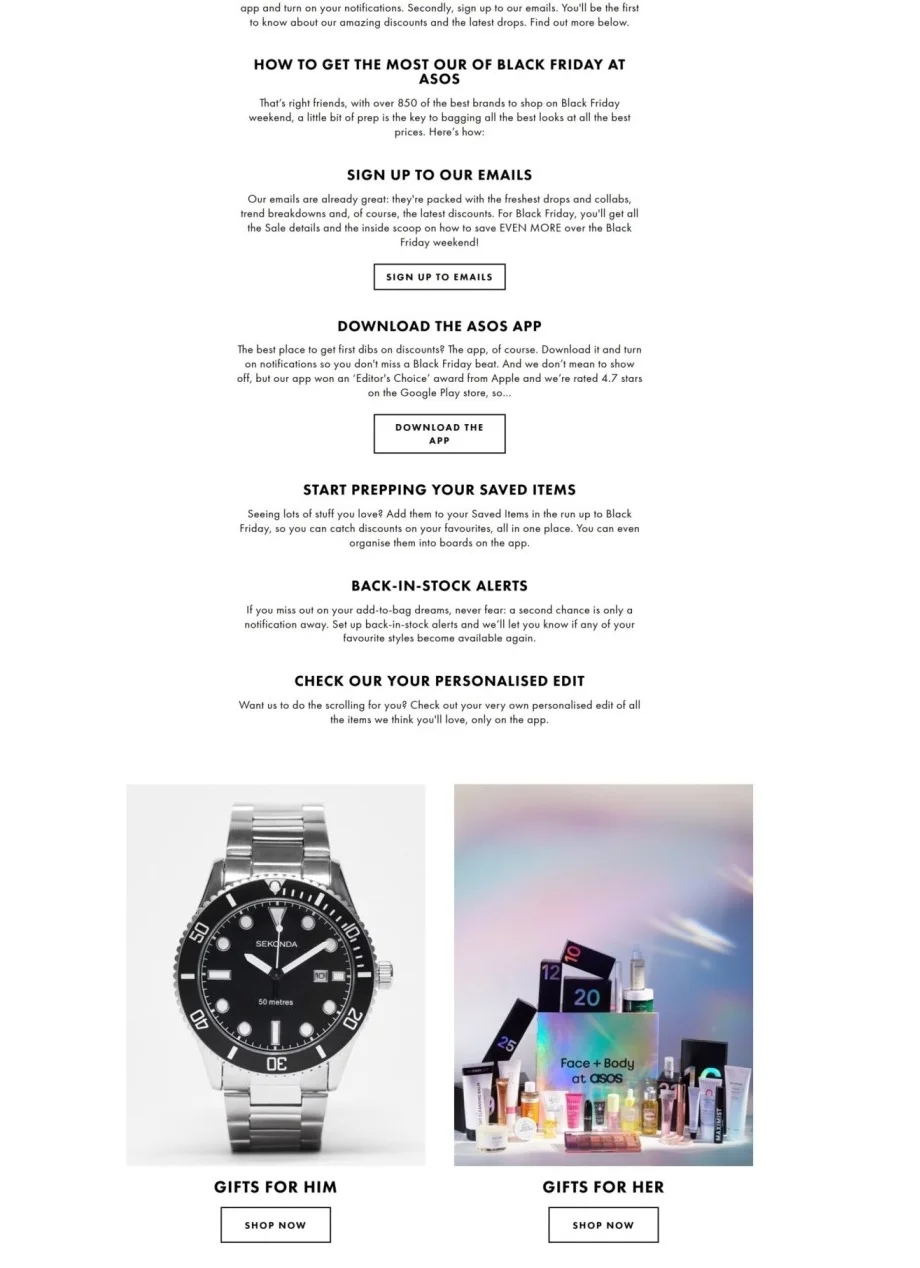
So, instead of manually updating them, use AI to update schema markups well before your Black Friday sale goes live. Here's a great Black Friday Sale page example from ASOS. Note how it shows ongoing deals and answers burning questions as to exactly what’s coming for their BFCM sale:

Especially, take note of the FAQ section, note how it nudges shoppers to get a wishlist for BFCM started:
AI can detect which factors customers mention the most, like price, quality, or shipping speed and tailor the review summaries to highlight these during your BFCM campaign.
For example, your BFCM campaign might show different review highlights for family buyers compared to tech enthusiasts. Plus, when the product page says, “95% of shoppers loved the fast shipping!” it’s a perfect sell for those urgent BFCM buyers.
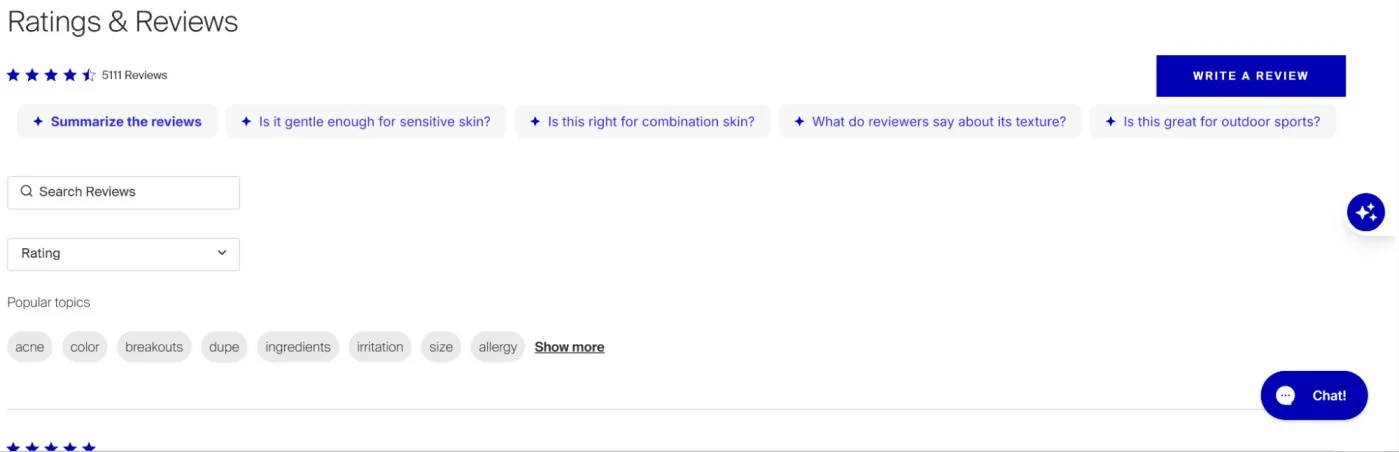
Pro Tip: Use AI to show one word filters within reviews so shoppers can filter reviews based on what’s important to them. Whether it’s “most positive,” “best for durability,” or “best value for price,” AI helps customers quickly navigate product features that matter most to them during the BFCM rush.
Here’s a great example from Supergoop – note how they summarize reviews with Supergoop AI:
This may feel like news: but most shoppers actually get their wishlists ready at least 2 weeks before the BFCM weekend even arrives.
Which means, most shoppers are already on their phones, passively scrolling through deals.
Here’s where AI comes in.
You pick the top engaged shoppers in your list and send an SMS when shoppers are most likely to click.
For example, you can publish your campaigns, but your SMS only sends during peak engagement hours, like during commute hours or lunch breaks.
You can also change up time zones to adjust for the time of day, like they receive a message meant for noon, during their actual noon (while you grab some sleep).
Instead of “here’s an additional X% off”, offer a non-intrusive popup, saying something on the lines of “Lock this product’s prices for me."
Once someone clicks, ask for their email and trigger a custom BFCM cart abandonment email flow.
This way, you can also tell if there’s purchase intent, without being pushy. If someone dismisses the pop-up, you can use AI to retarget with a relevant ad based on other metrics like actions on page, time on page, etc.
Quick Tip: You can also add an additional layer of urgency when a shopper selects a size/variant. Say something like, "Only 3 left in your size."
Some shoppers just want a straight XX% off. Others want the discount and free shipping.
Some, a BOGO deal. And plenty don’t fully trust Black Friday discounts.
The fix? Use AI to swap out offers and incentives on banners and microcopy within your homepage based on shopper history, location, or activity.
For example, in areas with high return rates, highlight extended returns. In areas where free shipping is a big deal, offer free shipping (but std. returns).
This way, you nudge different shoppers with the incentive they care about, without cutting out margins.
The goal here: better image search rankings. By this we mean using AI to generate clear alt texts for images, transcripts for product videos, and image sitemaps.
If you’re using Shopify, you can use its built-in AI features to generate not only descriptions for images, but also product page copy.
98% of visitors who visit an eCommerce site—drop off without buying anything.
Why: user experience issues that cause friction for visitors.
This is a pattern you can't afford during the Black Friday weekend, which is a great opportunity for high conversions.
Thankfully, this is the problem Convertcart solves.
We've helped 500+ eCommerce stores (in the US) improve user experience—and 2X their conversions.
How we can help you:
Our conversion experts can audit your site—identify UX issues, and suggest changes to improve conversions.
Subscribe for more articles like this!


Read by 5000+ ecommerce store owners
.svg)


.svg)

.svg)
.svg)
2026 Convertcart, All Rights Reserved
33/1, Castle Street, Ashok Nagar, Bengaluru, India